 Generating the Converter Service Group
To be able to configure one or more than one Web service client in the NetWeaver Administrator, you have to create a Service Group in the consumer.
Procedure
In the Project Explorer, expand the converterwebearproject.
Right-click ConverterBean.wsdldocument, and then choose
 Web Services
  Create Configuration Data
  . The Create Service Groupwizard
opens.
. The Create Service Groupwizard
opens.In the Packagefield, enter com.sap.tutorial.javaee.servicegroup.ConverterBeanPort.
In the Namefield, enter ConverterServiceGroup.
In the Create inproject field, choose [LocalDevelopment] converterwebclient.
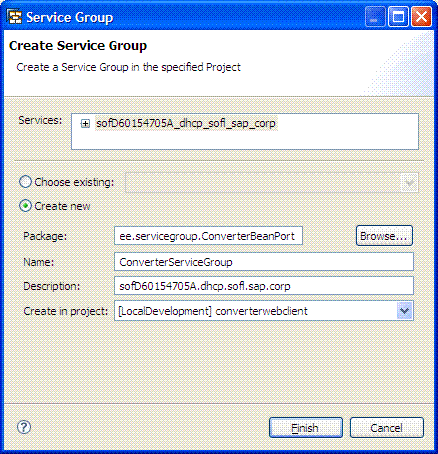
Choose Finish.
Result
The system creates the Service Group and its service references. The Service Group files appear under the Connectivity folder of the converterwebclient project.