
 Security Guide for XML-Based Data
Archiving
Security Guide for XML-Based Data
Archiving

The XML-based data archiving technology complements ADK, an established technology used for data archiving. Both are employed to extract dormant data from growing databases and provide long-term access to this archived data. However, as the name states, XML-based archiving was designed for new XML-oriented ABAP and all JAVA applications.
XML-based archiving relies on the XML Data Archiving Service (XML DAS), which is part of a standard Application Server Java (AS Java) installation. If an application wants to use XML DAS it can do so with the help of an XML DAS Connector for either ABAP or JAVA, depending on its requirements. This documentation deals with the security aspects for new XML-based ABAP archiving objects and JAVA-implemented archiving sets that communicate with the AS Java’s XML DAS.
Technical System Landscape: Security-Relevant Interfaces
The following figure shows the different elements you need for XML-based data archiving, and the interfaces that connect these elements.
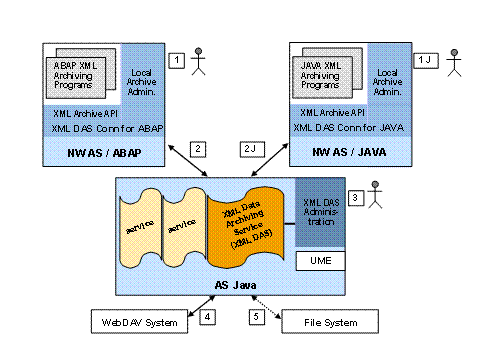

The divisions shown in the figure are conceptual and are meant to clarify the different elements involved in XML-based archiving. In a realistic scenario it is entirely possible that the ABAP and the JAVA elements run within one SAP NW AS system, or even that the AS Java of which the XML DAS is a part, is also installed on the same SAP NW AS system. Likewise, the figure does not mean to imply that a WebDAV system and a file system both have to be installed for XML-based archiving. It is possible to be using only one of the two to store archive files.
From a security point of view, the interfaces shown in the figure can be described as follows:
● Interfaces 1 and 1J: End users and data archiving administrator(s) accessing the ABAP or JAVA application systems.
● Interfaces 2 and 2J: Communication interface between the ABAP or JAVA application system and the AS Java system hosting XML DAS.
● Interface 3: User interface for XML DAS administrator(s).
● Interface 4: WebDAV interface between XML DAS and the external WebDAV-enabled storage system (WebDAV system).
● Interface 5: File system interface.
User Authorization and Client Authentication
Interfaces 1, 1J and 3
These are interfaces where individual users can access the system. These users can be any of the following:
● The end user and the data archiving administrator of the local application system (interfaces 1 and 1J).
End user security is handled application-specifically, meaning that access to archived data is restricted according to archiving-object-specific or archiving-set-specific authorizations. The main task of the data archiving administrator is to configure, schedule and monitor the archiving process. However, if enabled by applications, administrators can also be allowed to display archived data in a technical form. The user names are not predefined.
For the ABAP data archiving administrator, the system checks the following:
○
Does the logged-in
user have the authorizations required by authorization object S_ARCHIVE to
start Archive Administration (transaction SARA) and to work with the chosen
archiving object? For more information about S_ARCHIVE, see
 User Authorization
Checks under the ADK documentation.
User Authorization
Checks under the ADK documentation.
○ Is the logged-in user allowed to display archived resources from archive management in transaction SARA, according to the application-specific authorizations documented by the corresponding XML archiving object? These authorizations are checked using the BAdI XML_DAS_AUTH_CHECK.
○ The S_ARCHIVE authorization object is also used by the XML archive API to check that the user has the correct authorization to perform an action. This means that even if the XML archiving programs are scheduled externally (outside of transaction SARA) the same S_ARCHIVE checks take place.
For current JAVA archiving sets, an application-independent local archive administration has not yet been released. Consult the documentation of the archiving sets you are using.
● The XML Data Archiving Service administrator (interface 3)
The XML DAS Administration is a browser application started via the following http address:
http://<Host of AS Java >:<HTTP port>/DataArchivingService/DAS
For example: http://localhost:50000/DataArchivingService/DAS
For the data archiving administrator an arbitrary number of users are possible. The users must be known to the user management of the AS Java hosting XML DAS. For the administration users to be valid they must be assigned to the UME roles SAP_ARCH_XMLDAS_VIEW (for read-only authorization) or SAP_ARCH_SUPERADMIN (for read/write/execute authorization).
a.
Create a user or as
many users as you like using the appropriate user management function. For an
add-in installation you can either use ABAP transaction SU01 (for more
information see
Creating and Editing
User Master Records) or the User Management Engine (UME)
(for more information see
Administration of
Users and Roles).
For a
stand-alone installation use the UME
(for more information see
Administration of
Users and Roles). If you are creating an administration user, the security
policy setting should be Default. If you are creating a technical
communications user the security policy setting should be Technical User.
b. Assign each administration user role to either SAP_ARCH_XMLDAS_VIEW (for read-only authorization) or SAP_ARCH_SUPERADMIN (for read/write/execute authorization):
i. Call the User Management Engine (UME) and go to Identity Management.
ii. Go to the Assigned Roles tab strip
iii. Under Available Roles find the roles you want to assign and use Add to assign the appropriate role to the user according to the authorization level the user needs.
For more
information see
Assigning Principals
to Roles or Groups.
Interfaces 2, 2J, 4 and 5
These interfaces are used for technical communication only:
● Interface 2 and 2J: You can use any of the HTTP authentication methods supported by the participating client system (the system hosting the XML DAS Connector) and the AS Java, such as Basic Authentication, Basic Authentication with SSL (HTTPS), or Client Certification.
The technical communication users must be known to the AS Java and must have been assigned to the security role XMLDASSecurityRole. You can assign the role in the Visual Administrator:
...
a. Start the Visual Administrator.
b. Under Cluster, select <your server> ® Services ® Security Provider.
c. In the Policy Configurations tab and under Components select sap.com/tc~TechSrv~XML_DAS*DataArchivingService.
d. Go to the Security Roles tab and select XMLDASSecurityRole (make sure the role type Security Role is selected).
e. Under Mappings use the Add function for Users to search for the roles and assign your user to that role.
If HTTPS is
used, the HTTP SSL port must be specified in the destination instead of the
HTTP port. For more information see
Configuring the Use of
SSL on the AS Java.
The places to set up the connection depend on whether archiving objects (ABAP) or archiving sets (JAVA) are used in the application system:
○ Creating an HTTP destination for XML DAS using transaction SM59 (applicable for XML archiving objects in the ABAP environment):
RFC destination: <new name> (for example: XML_DAS)
Connection type: G (HTTP connection to an external server)
Description: <description> (for example: AS Java running XML DAS)
Technical settings:
Target host: <address of AS Java host>
Service No.: <HTTP Port or HTTP SSL Port>
PathPrefix: /DataArchivingService/DAS
Logon/Security
Security Options: for example Basic Authentication, SSL inactive
Logon: User: <UME user assigned to security role XMLDASSecurityRole>
Password: <corresponding UME password>
If you want
to use HTTPS refer to
Types of
Destinations (Connection Type G) and
Using the Trust
Manager.
○ Creating an HTTP Destination for XML DAS using the destination service of the AS Java (applicable for archiving sets in the JAVA environment):
...
...
...
1. Open the Visual Administrator for the AS Java.
2. For every server that has to send requests to the XML DAS, choose services ® Destinations.
3. Create a new HTTP destination.
4. Choose DASdefault as the name for the destination.
5. Specify the URL such as http://<name of host running the DAS>:<HTTP-Port>/DataArchivingService/DAS,
(for example http://mainarchive.mycompany.corp:50000/DataArchivingService/DAS).
6. Choose “BASIC” as Authentication method.
7. Enter a username and password.
8. Save the settings.
If you want to use HTTPS instead of Basic Authentication, proceed as follows:
...
1. Create a new destination as described above. Make sure that you enter the SSL-Port in the URL (for example 50001 instead of 50000).
2. For the authentication method enter X.509 Client Certificate.
3. Under Client Certificate Authentication, choose service-ssl as keystore view and select the appropriate credentials.
4. Save the settings and update the customizing of the XML DAS Connector for Java with the new destination name.
●
Interface
4: An HTTP destination is
used to connect the XML DAS to the an external WebDAV server. For more
information on creating HTTP destinations, see Creating
Destinations under
Configuring the XML
Data Archiving Service of the Configuration Guide.
● Interface 5: If you decide to store your resources in a file system that is accessible from the AS Java, you can do so by specifying the directory using the XML DAS administration (function Define Archive Stores).
Users
The following table is a summary of users needed for XML Archiving:
System |
User(s) |
Delivered |
Type |
Default Password |
XML Data Archiving Service Administrator(s) (AS Java) |
has to be defined in SAP NW AS and assigned to roles SAP_ARCH_XML_DAS_VIEW (read) SAP_ARCH_SUPERADMIN (read/write/execute) |
No |
Individual administrator(s) |
(has to be defined in SAP NW AS) |
XML Data Archiving Service Communication (AS Java) |
has to be defined in SAP NW AS and assigned to security role XMLDASSecurityRole |
No |
Technical user(s) |
(has to be defined in SAP NW AS) |
WebDAV System connected to a AS Java |
has to be defined in the WebDAV server itself and made part of the HTTP destination used to connect to the WebDAV server) |
No |
Technical user |
(has to be defined in WebDAV server itself and made part of the HTTP destination used to connect to the WebDAV server) |
Data Storage Security
The XML DAS
collection hierarchy, properties and other meta data are stored in the AS
Java. The XML DAS uses the database pool alias SAP/BC_XMLA. For further details see
Security Aspects for
the Database Connection.
The collections and resources are stored in a WebDAV system or in a file system (see above). If a file system is used, directories and files are created by the AS Java. More specifically, the user employed for a Windows systems in this case is SAPService<sid> and for UNIX systems <sid>adm. Therefore, the directory needs to have the appropriate access privileges. See also: Operating System Security.

To prevent unauthorized access or harmful alteration or deletion of resources or directories in the file system, give the appropriate access privileges only to SAPService<sid> or <sid>adm, respectively.
Do not manually create or delete directories or files once the archive store root directory is fixed.
In order to verify (on read request) that the content of archived resource has not changed, SAP recommends that you use the check sum option.
In ABAP you can find this function in Archive Administration (transaction SARA) by choosing Customizing ® Configuration of the XML DAS: Check Sum
Trace and Log Files
Trace and log files are written for the XML DAS and the XML DAS Connector for Java by the AS Java:
● The log file for the XML DAS is located in the log directory of the server running the XML DAS in the applications.log file under the category /Applications/Common/Archiving/XML_DAS.
● Traces for the XML DAS are written in the default trace file using the location com.sap.archtech.daservice.
● The log file for the XML DAS Connector for Java is located in the log directory of the server running an archiving application in the applications.log file under the category /Applications/Common/Archiving/Connector.
● Traces for the XML DAS Connector for Java are written in the default trace file using the location com.sap.archtech.archconn.
For XML archiving objects, the usual job logs are written by the XML DAS Connector for ABAP. In addition, for every explicit deletion of a resource or a collection, a system log entry (syslog) is created with message ID DA1 and problem class S (operation trace), which documents the deletion of the resource or the collection.