
 Additional Information

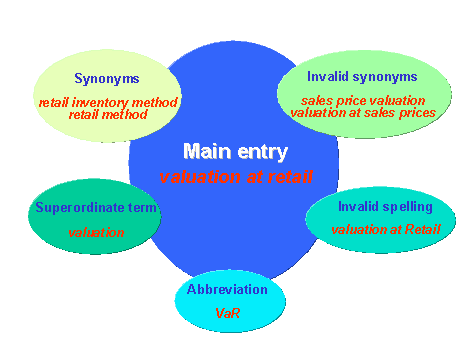
You can maintain the following additional information for a term:
- Abbreviations
- Synonyms
- Invalid synonyms
- Superordinate terms
- Invalid spelling

A counter appears next to the respective additional information tab title in the Maintain Entry screen if abbreviations, synonyms, and so on already exist for a main entry.
Abbreviations
Use
You can enter abbreviations (meaning abbreviations, initialisms, and acronyms) that occur in the SAP System and in the documentation.
Abbreviations create special difficulties for translation. You should document abbreviations in this field whenever you encounter them.
Prerequisites
In general, enter an abbreviation in the Abbreviation field and use the full string as the main term.
If the abbreviation is more commonly used than the full string, enter the abbreviation as the term and enter the full string in full form in one of the following locations (in order of priority):
- If the term has a glossary entry, enter the full form in the first line of the glossary entry, followed by the definition.
- If the term does not have a glossary entry, enter the full form in the Comment field.
- In both cases, enter the full form in the Valid synonym field where applicable.
- Do not enter an abbreviation in parentheses after a main entry.
- Do not enter an abbreviation that is longer than the main entry.
- Enter each abbreviation in a separate line.
Procedure
From the
Maintain entry screen, choose the Abbreviations tab.
In this tab page, enter the abbreviation in the field provided.
Choose the Save icon to the left of this field.
Repeat this procedure for each abbreviation that you wish to maintain.
Synonyms
Use
Synonyms are terms that can be used in place of the main entry. For example, you can enter a shorter version of the main entry, which can then be used to avoid clumsy repetitions.
Do not create synonyms that do not exist in the system or in the documentation. The focus of terminology work is the standardization of terms where possible and the avoidance of synonyms. If synonyms exist, however, you need to document them, perhaps in order to standardize them later.
Avoid entering unnecessary synonyms (such as "order" for "purchase order", which it is normally obvious from the context).
Prerequisites
The meaning is clear from the context.
You have already explained the meaning of the synonym in the text.
Enter each valid synonym in a separate line.
Procedure
From the
Maintain entry screen, choose the Synonyms tab.
In this tab page, enter the synonym in the field provided.
Choose the Save icon to the left of this field.
Repeat this procedure for each synonym that you wish to maintain.
Invalid Synonyms
Use
Invalid synonyms are terms that are not to be used in place of the main entry.
Prerequisites
Enter synonyms that are used internally but are not to be used in customer documentation
Enter terms that have changed between the R/2 System and the R/3 System
Do not enter variant spellings as invalid synonyms. See
Invalid Spellings
below.
Enter each invalid synonym in a separate line.
Note that, if a term changes from one release to another, you should store this information in a separate
KW context. This ensures that the old term is still valid for a given release but invalid for another. An invalid synonym, on the other hand, is invalid in all instances applying to a term context.
Procedure
From the
Maintain entry screen, choose the Invalid Synonyms tab.
In this tab page, enter the invalid synonym in the field provided.
Choose the Save icon to the left of this field.
Repeat this procedure for each invalid synonym that you wish to maintain.
Superordinate Terms
Use
Superordinate terms are umbrella terms related to the main entry as part of a physical or conceptual relationship. You can create hierarchies of relationships by assigning subordinate terms to their superordinate concepts.
Prerequisites
In order to create a hierarchical assignment of terms, you need to enter a term that already exists in SAPterm as a Superordinate Term.Enter each conceptual relationship in a separate line.
Procedure
From the
Maintain entry screen, choose the Superordinate Terms tab.
In this tab page, enter the superordinate term in the field provided.
Choose the Save icon to the left of this field.
Repeat this procedure for each superordinate term that you wish to maintain.
Invalid Spelling
Use
Terms entered under Invalid Spelling are variant spellings of the main entry that are not allowed. The Invalid Spelling information is also intended to simplify language tool support for search-and-replace during cleanup actions.
Procedure
From the
Maintain entry screen, choose the Invalid spelling tab.
In this tab page, enter the invalid spelling in the field provided.
Choose the Save icon to the left of this field.
Repeat this procedure for each invalid spelling that you wish to maintain.