
 Java Proxies as Sender

Use
You want to send messages from a J2EE application to the Integration Server.
Integration
You must deploy the proxy beans and proxy classes generated by Java proxy generation together with the application program. To do so, include them in the same EAR file that contains the classes of your application. However, the generated classes are dependent on the classes of the Java proxy framework, which must be installed on the J2EE server. To declare this dependency for EJB applications, include the following packages in the descriptor file application-j2ee-engine.xml:
com.sap.aii.proxy.xiruntime
com.sap.aii.messaging.runtime
com.sap.xi.util.misc
com.sap.guid
All library dependencies are of type weak and have the provider name sap.com.
Prerequisites
In the Integration Repository, you have created an outbound message interface for describing caller interfaces. Using Java proxy generation, you have created client proxy beans and client proxy classes, which you include in your application.
Features
General
Java proxy generation generates all the Java classes necessary for a client proxy: the EJB 2.0 bean class, home and remoteinterfaces, local home and local interfaces, as well as Java classes for the data types used.
The client proxy bean for the outbound message interface is a stateless session bean. To send messages and use other services, you use normal EJB calls: First, localize the bean by using JNDI. Next, create a home or local homeinterface and then create a remote or local interface for the bean. Finally, call the method for the remote or localinterface. The bean then calls the corresponding method of the client proxy class. This method generates a message from the call and forwards it to the Integration Server by using the messaging system:
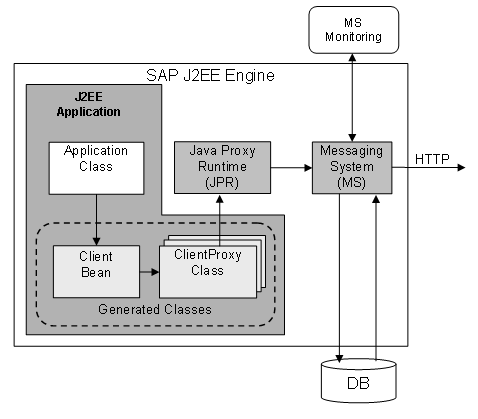

For more information about configuration and monitoring of the messaging system, see the configuration guide SAP MarketSet Adapter and Messaging System under http://service.sap.com/instguides, SAP Exchange Infrastructure.
To use further services of the Java proxy runtime, use the MessageSpecifier interface. For example, this interface enables you to send attachments together with the message. See: MessageSpecifier Interface.
Co-Located Beans
Since the proxy runtime supports EJB 2.0, you can use co-located beans. These beans are deployed in the same EJB container system and executed on the same Java VM. The advantage of co-located beans is that they improve performance.
You access co-located beans by using the local and local homeinterfaces, which are generated in addition to the home and remoteinterfaces from EJB1.1. To differentiate co-located beans from remote beans, use the prefix “localejbs/”.
Indirect Outbound Communication
In this case the standalone application calls a proxy bean on the SAP J2EE Engine. The J2EE server only finds the called proxy bean if the file jndi.properties can be found in the class path and is configured correspondingly. The file enables the application to locate the proxy bean by using the naming service of the J2EE server. It must be located in the work directory of the standalone application and contain the following entries:
java.naming.factory.initial=com.sap.engine.services.jndi.InitialContextFactoryImpl
java.naming.provider.url=<host>:<p4port>
(or java.naming.provider.url=localhost:50004)
java.naming.security.principal=Administrator
java.naming.security.credentials=<Password>
Alternatively, you can also set these attributes directly in your application program.
Otherwise there are no differences to programming against a proxy bean from a J2EE application.