
 Business Description
(SingleFlightBooking)
Business Description
(SingleFlightBooking)

Purpose
A travel agency uses the SingleFlightBooking integration scenario to book a flight with an airline. The booking refers to exactly one flight for exactly one passenger. The airline sends a response stating whether the booking was successful or not.
Process Flow
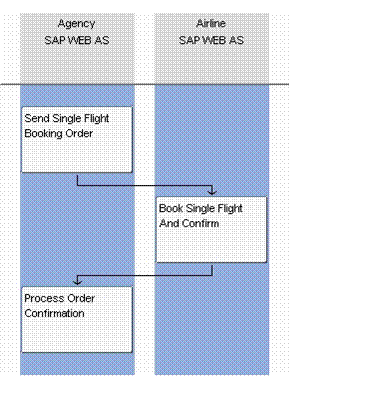
The integration scenario comprises two asynchronous communication steps between the travel agency and the airline:
...
1. The travel agency sends an order for a flight booking to an airline.
The order contains:
¡ Travel agency ID, booking order number, and flight class for the flight to be booked
¡ Information required to uniquely identify the flight (airline ID, flight number, flight date)
¡ Information about the passenger for whom the flight is to be booked (first name, surname, date of birth)
2. The airline receives the flight booking order and executes the flight booking. The airline sends a booking confirmation to the travel agency.
The booking confirmation contains:
¡ Flight booking number of the airline and the airline ID
¡ Travel agency ID, booking order number
¡ Booking status (specifies whether the booking was successful or failed)
If the airline cannot send a response for the flight booking due to technical reasons, an error is triggered in the airline application.
3. The travel agency receives the booking confirmation and updates the booking status in its system.
If the travel agency cannot process the booking confirmation, an error is triggered in the travel agency application.
From a technical perspective, the travel agency always communicates using the ABAP proxy runtime. However, the airline has two communication options:
· Communication using the ABAP proxy runtime (compare with the component view ABAP_Proxy_2_ABAP_Proxy in integration scenario SingleFlightBooking)
· Communication using the IDoc runtime (compare with the component view ABAP_Proxy_2_IDoc in integration scenario SingleFlightBooking)
.