
 Versioning in Transports

General
XI objects are transported within SAP Exchange Infrastructure for the following reasons:
· To ship objects from the Integration Repository
· To test a development in the Integration Repository or a Integration Directory configuration separately
You can transport XI objects by exporting and importing files (see: Transporting Using the File System) or by using the Change Management Service (see Transporting Using the Change Management Service).
Transport Logistics
Integration Repository
Integration Repository objects have one original repository, in other words an Integration Repository from which an object originates. Within an Integration Repository you can differentiate between original objects and copies by using an attribute of the corresponding software component version.
Due to the originality principle, transport landscapes for Integration Repositories are star-shaped:

You should only make changes to an object in the Integration Repository from which the object originates. The new versions of this object are then created when it is imported into the target repository so that the object has the same version in both repositories (see figure):
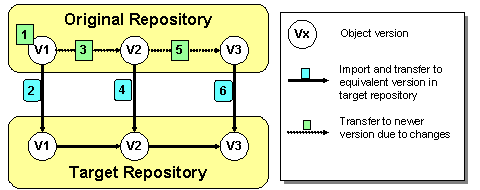
As shown here, object versions in the various repositories are consistent. This is ensured by the following mechanisms:
· You should lock objects in the target repository against entries (see Object Attributes in Software Component Versions). Nevertheless, you do have the option of temporarily changing objects in the target repository, but this can lead to a conflict when you import the objects (see: Conflicts when Importing Objects).
· When you import older object versions to a target repository, all new object versions that already exist there are not overwritten. The older version being imported is visible in the object history following the import. The more recent version remains the current version.

This means that multiple imports into a repository can lead to the same end result, regardless of the sequence in which they are imported.
Integration Directory
At configuration time you have the option of testing the configuration in a test directory. If the tests are successful, you can then transport the configuration objects in the test directory to the directory for the productive landscape.

We recommend that you work with a System Landscape Directory (SLD), in which you have entered the test environment systems and the productive environment systems for this procedure. Using groups and transport targets in the SLD, you can automatically convert the system names of the test system to the system names of the productive system. For information about alternative SLD scenarios, see SAP Note 764393.
Therefore, at configuration time, transports are not used to ship objects, but to test the configuration separately from the productive landscape before it is used productively as part of SAP Exchange Infrastructure.
· There are no software component versions in the Integration Directory. You can export all objects of a scenario, party, service, or individual objects.
· No large transport landscape with multiple directories is required. As a rule, one test directory and one productive directory is sufficient. There is also a test repository and a productive repository. If required, you can of course also create three-tier or four-tier test landscapes.
Objects in the Integration Directory reference objects in the Integration Repository. We therefore recommend that you first transport the required Integration Repository objects, followed by the Integration Directory objects. The configuration is not complete if the Integration Directory references objects in the Integration Repository that have not yet been imported. You can import the missing objects into the Integration Repository at a later date, if applicable.
In the test scenarios at configuration time, it is not always the case that the most recent version from the test directory is transported to the productive directory. Often an older version is the more appropriate version. Therefore, unlike when importing in the Integration Repository, when importing objects to a directory, version management always creates a new version for the objects:
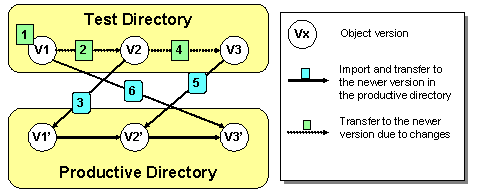
In the example, the initial version V1 of an object is exported from the test directory. Since a new version ID is created when you import objects to the productive directory (here V3’ for V1), you can import version V1 to the productive directory despite the fact that the more recent versions V2 and V3 have already been imported.