
 Standard Functions

General
Values of elements or attributes of the XML message (the payload) are, technically speaking, a string. Therefore, all standard functions that operate on field values expect string arguments and return a string value. Nevertheless, the transferred value can of course have a different semantic data type, namely, the one that you specified when you defined the schema for the payload for the field. Standard functions exhibit the following standard behavior:
● Depending on the standard function, data type conversions are used to ensure that the values are transferred in a format suitable for the function (using a cast). If the value cannot be interpreted, the mapping runtime triggers a Java exception.
● If-clauses evaluate conditions that return Boolean values. Standard functions that return Boolean values return the string true or false. Standard functions that expect Boolean values interpret the values”1” and ”true” (not case-sensitive) as true and all other values as false.

See also: Runtime Behavior.
Function Overview
Data-flow objects for standard functions are structured as follows:
● Most data-flow objects have two or three inbound channels on the left-hand side, and one outbound channel on the right-hand side.
● If functions are shaped as rhombuses or triangles.
● There are also conversion functions with one inbound and outbound channel and functions that return a value without any input.
●
Standard functions
that require additional specifications are indicated with a star ( ). To call the dialog for Function
Properties, double click the data-flow object.
). To call the dialog for Function
Properties, double click the data-flow object.
The following figure provides an overview of all the different forms of data-flow objects:
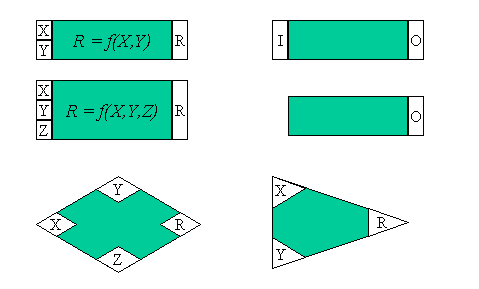
To illustrate how the individual functions are used, the input boxes in the figure above have the variables X, Y, Z or I, and the result variable is either R or O. All standard functions in the tables below are described using these input and output variables. In the data-flow editor, other data-flow objects that are connected to the functions using the connecting boxes either return the input values or receive the result of the operation. You can combine the functions in any way you require (provided that the values transferred to a function can be interpreted).
Arithmetic
You can only enter numerical values for this category (this includes values with digits after the decimal point). If the value cannot be interpreted as a digit, then the system triggers a Java exception. Otherwise, all calculations are executed with the precision of the Java data type float. The format of the result value depends on the result:
● If the result is a value with digits after the decimal point, these remain unchanged.
● Exception: If a zero follows the decimal point, then this is cut off. This means that the result of the calculation 4.2 – 0.2 is 4 and not 4.0.
Function Name |
Function |
add |
R = X + Y |
subtract |
R = X - Y |
equalsA |
R = true, if value X equals value Y, otherwise R = false. The values are interpreted numerically, therefore the value 1.5 is the same as 1.50. |
abs |
O = Absolute value of I |
sqrt |
R is the square root of X |
sqr |
R is the square of X |
sign |
R = 1, when X is a positive number R = 0, when X equals 0 R = -1, when X is a negative number |
neg |
R = -X |
1/x |
R is the reciprocal of X |
power |
R = XY |
less |
True, when X < Y, otherwise false |
greater |
True, when X > Y, otherwise false |
multiply |
R = X * Y |
divide |
R = X / Y |
max |
R = Maximum of values X and Y |
min |
R = Minimum of values X and Y |
ceil |
O = The smallest possible integer value (up to minus 'infinite’) that is not smaller than the argument I. Corresponds to the Java function java.lang.Math.ceil(). |
floor |
O = The largest possible integer value that is not larger than the argument I. Corresponds to the Java function java.lang.Math.floor(). |
round |
O = Integer value back that is closest to the value of argument I. Corresponds to the Java function java.lang.Math.round(). |
counter |
O = Number of calls for this target-field mapping where you specify the initial value and the increment of the counter in the function properties. |
FormatNum |
Converts I according to a pattern that you define using the function properties. The possible patterns are the same as in the Java class java.text.DecimalFormat. |
Boolean
All functions in this category expect Boolean input values (see above).
Function Name |
Function |
And |
R is true if X and Y have the value true. Otherwise, R is false. |
Or |
R is true if X or Y have the value true. Otherwise, R is false. |
Not |
● O is false if I has the value true ● O is true if I has the value false |
Equals |
Compares both Boolean values X and Y and returns true if both are equal, otherwise false. Non-Boolean values are interpreted as false (see above). Use the functions equalsS or compare from the Text category to compare strings. |
notEquals |
R = Not(Equals(X,Y)) |
if |
● If condition X is fulfilled (returns true): R = Y ● If condition X is not fulfilled (gets false): R = Z |
If condition X is fulfilled (returns true): R = Y. Otherwise, the target field is not created. |
Constants
Since these functions do not have any input values, they are generating functions.
Function |
Use |
Constant |
O gets any string constant that you can enter in the dialog for the function properties. |
For a frequently occurring element, copies the value at a defined position in the source structure to the assigned target field. |
|
sender |
O gets the name of the sender business system. Test_Sender_System is output when you test the message mapping in the Integration Builder. |
receiver |
O returns the name of the receiver business system. Test_Receiver_System is output when you test the message mapping in the Integration Builder. |
Conversions
Function |
Use |
FixValues |
Executes a value mapping using a fixed value table that you complete using the function properties. The table is saved together with the most current message mapping and can only be used once. |
Date
The following functions enable you to define the date format for the source or target format using the dialog for the function properties.
The format adheres to the convention as defined in the standard Java class java.util.SimpleDateFormat. The function properties dialog provides you with a wizard that you can use to enter the most frequently used date formats.
Function |
Use |
currentDate |
Returns the current date using O. This function is a generating function. |
DateTrans |
Converts date format I to another date format O. |
DateBefore |
R = true, when date X comes before date Y, otherwise false |
DateAfter |
R = true, when date X comes after date Y, otherwise false. |
CompareDates |
R = 1, when date X is after date Y |
Node Functions
Function |
Use |
If there are structuring elements in your target structure that do not exist in the source structure, insert them using this function. Using condition I you can control whether the element is inserted or not. You connect the element in the target structure using O. |
|
Removes all higher-level contexts of a source field. In this way, you can delete all hierarchy levels and generate a list. |
|
replaceValue |
Replaces the value I with a value that you can define in the dialog for the function properties. |
O = true, if the source field assigned to inbound channel I exists in the XML instance. Otherwise, false. |
|
Inserts a context change for an element. |
|
Replaces all values within all contexts with an empty string. This is a useful function when used in combination with SplitByValue. |
|
Replicates a value of a field occurring once to pair it as a record with the values of a field occurring more than once. |
|
sort |
Sorts all values of the multiply-occurring inbound field I within the existing or set context. The sorting process is stable (the order of elements that are the same is not switched) and it sorts the values in O(n*log(n)) steps. Using the function properties, you can specify whether values are to be sorted numerically or lexicographically (case-sensitive or non case-sensitive) and in ascending or descending order. |
sortByKey |
Like sort, but with two inbound parameters to sort (key/value) pairs. The sort process can be compared to that of a table with two columns. ●
Using the first
parameter, you pass key values from the first column, which are used to sort
the table. If you have classified the key values as numeric in the function
properties, they must not be equal to the constant ResultList.SUPPRESS. See
also:
● Using the second parameter, you pass the values from the second column of the table. If there is a discrepancy between the number of keys and values, the mapping runtime triggers an exception. The function returns a queue with the values sorted according to the keys. |
mapWithDefault |
Replaces empty contexts in the inbound queue with a default value, which you specify in the function properties.
Example: If Default is the default value and A|B1,B2| |C| |D is the inbound queue then mapWithDefault gets the following outbound queue: A | B1,B2 | Default | C | Default |D. The function corresponds to the following combination of standard functions: If( []field, exists([]field), Constant([value=default])) |
This function has two inbound queues, which must both have the same number of values. To generate the result queue, the function takes the values from the first queue and combines them with the context changes from the second queue. |
 ResultList
Object
ResultList
ObjectStatistics
The functions of this function category are designed for source fields that occur more than once in the source structure (maxOccurs = i > 1).
Function |
Use |
sum |
R = Sum of values X1 to Xi of a context. |
average |
R = Average of values X1 to Xi of a context |
count |
R = Number of fields in a context (i) |
index |
R = Index i to Xi. In the function properties, you specify the following: the initial value of i, the increment, and whether the index value is to be reinitialized at the beginning of every new context, or whether it is to have the same value for the entire source structure. |
Text
In position specifications, the 0 position corresponds to the first character in the string.
Function |
Use |
substring |
Returns a substring O for a string I. Use the dialog for the function properties to specify the position of the substring. Example: substring(“Hello”, 0,1) = “H”, means that the substring from Startindex 0 to Endindex 1 (not including position 1) is shown. |
concat |
R = Linking of strings X and Y (without blanks). Example: X = "Mrs."; Y = "Miller"; R = "Mrs.Miller". Use the dialog for the function properties to insert a separator in the string. |
equalsS |
R = true, if string X equals string Y, otherwise R = false. |
indexOf |
R = first position at which string Y is found in X and –1 if Y does not occur at all. |
indexOf |
R = first position from position Z at which string Y is found in X and –1 if Y does not occur at all. |
lastIndexOf |
R = last position at which string Y is found in X and –1 if Y does not occur at all. |
lastIndexOf |
R = last position from position z at which string Y is found in X and –1 if Y does not occur at all. |
compare |
Compares string X with string Y: R = 0, when the strings are equal i specifies the difference between the two strings lexicographically. The function acts in the same way as the compareTo() method of the JDK class java.lang.String. |
replaceString |
X : String in which something is to be replaced Y: String to be replaced in X Z: String to replace Y R = String in which each occurrence of Y in X is replaced by Z.
X = "sparring with a purple porpoise" Y = “p” Z = “t” R = "starring with a turtle tortoise"
|
length |
O = Length of string |
endsWith |
R = true when Y is the last string in X; otherwise false. |
startsWith |
R = true when Y is the first string in X; otherwise false. |
startWith |
R = true when Y matches X from position Z; otherwise false. |
toUpperCase |
Converts all lower case letters in I to upper case letters. |
trim |
Removes all white space characters (spaces, tabs, returns) at the start and end of a string. Acts the same as the trim() method of the JDK class java.lang.String. |
toLowerCase |
Converts all upper case letters in I to lower case letters. |
