
 Completion of BRBACKUP Backups

The completion of database backups is relevant in the following situations:
· A backup has terminated and you do not want to repeat it. Using the BRBACKUP option -f|-fillup you can simply continue the backup. BRBACKUP automatically determines the files that are still to be backed up: target set (defined with the parameter backup_mode or the option -m) minus set backed up (BRBRACKUP detailed log). The completion of a backup can also refer to several terminated backups. In this case a new set of files to be backed up can be specified, differing from the original target volume set.
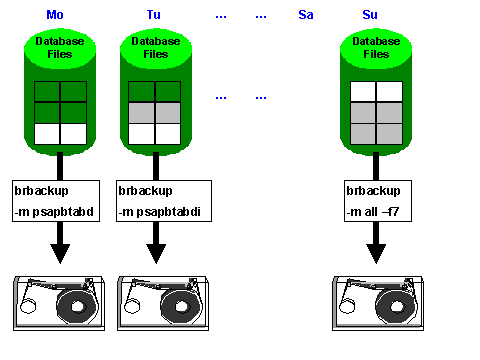
· You are making partial database backups and want to ensure, or monitor, that these will produce a complete backup. This is especially important for large databases, for which it is recommended to spread the backup over several days (for example, a week), in order to reduce the volume of data to be backed up every day. At the end of the week, to ensure that you have a complete backup, complete the partial backups on the last day of the cycle with the option -f|-fill. As above BRBACKUP automatically determines the files to be backed up.

brbackup -f b<timestamp>.pft : the backup with the log name b<timestamp>.pft is completed
brbackup -f last : the last executed backup is completed
brbackup -f 1 : the current day’s backup is completed
brbackup -f 7 : the backups of the last seven days (including the current day) are completed, as in the graphic above.
See also: