
 ABAP Proxy Runtime

Use
There are two different uses for the ABAP proxy runtime:
● You want to exchange messages with the Exchange Infrastructure Integration Server by using ABAP proxies. To send a message to the Integration Server, use a client proxy. To provide a service on the SAP Web AS that can be addressed by messages from the Integration Server, use a server proxy.
●
You want to call a
Web service in the Internet and have generated a client proxy for this
purpose. For a description of how Web services are used, see
 ABAP Web
Services.
ABAP Web
Services.
Integration
You generate proxies from an interface description in WSDL (Web Service Description Language) by using ABAP proxy generation. Before you generate a proxy, you can determine whether this description is to be loaded from the Integration Repository, the Exchange Infrastructure, a local file, a URL, or from a UDDI server.
Prerequisites
You can only use the program model described here for systems that are based on SAP Web AS 6.40 or higher.
Features
ABAP proxy runtime provides a uniform programming model for using proxies as a Web service or for XI (see Programming with Client and Server Proxies).
Uses for Client and Server Proxies
Client Proxy |
Server
Proxy |
Calls a Web service
in the Internet |
Provides a message
inbound interface as a Web service |
Direct XI communication between the XI proxy runtime
and the Integration Server, |
|
Point-to-point connection using Web services |
|
Point-to-Point Connections
Communication using Web services is synchronous and point-to-point. The XI runtime also supports synchronous communication, but needs the Integration Server to be able to forward messages. In the first case there is, of course, a performance advantage; in the second case you can use the mapping, routing, and BPM services of the Integration Server, and configure the receiver centrally:
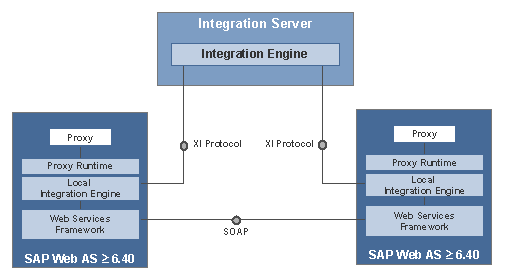
Since you can only generate server proxies from XI message interfaces, only SAP XI users can use point-to-point connections. See also Setting Up Point-to-Point Connections..