Data Flow for Master Data 
The overall data flow for products and locations is very similar. It runs as follows:
Extract data to the Data Acquisition Layer using DataSources:
BOBJ DataSources to push retailer data to the Persistent Staging Area (PSA)
File DataSources to pull retailer data to the PSA
SAP DataSources to extract company-internal data from SAP ECC. SAP DataSources require an additional step in which texts and attributes of material or customer master data are combined before transforming the data to the corresponding acquisition DataStore objects. This step is necessary to avoid conflicts in the sequence of the attribute and text upload.
BI DataSources to pull market research data.
Call quality validation (using the process flow control) to check if the delivered data can be forwarded according the defined criteria within quality validation.
Create internal numbers and forward the data to the Data Propagation Layer.
Create or update the internal and harmonized master data of the corresponding InfoObjects.
Extract harmonized objects into internal source InfoObjects, for example Internal Source Product and harmonized objects into harmonized InfoObjects (for example, Product) using BI DataSources.
 Note
Note
You can define a process definition for a complete data upload that covers the transfer of data to data harmonization as well as the extraction of the harmonization results from this upload process into the relevant InfoObjects. Subsequent changes performed in data harmonization — for example, changing global records using the data harmonization UI or resolving work items — can be uploaded to the InfoObjects (for example, Internal Source Product and Product) using a separate process definition. This process definition must be assigned to a data delivery agreement of the type Harmonization Data. You assign the data delivery agreement in Customizing for Data Harmonization under  Cross-Application Components
  Demand Data Foundation Data Harmonization General Settings
  .
.
Both process definitions can use the same process chains to extract data from data harmonization.
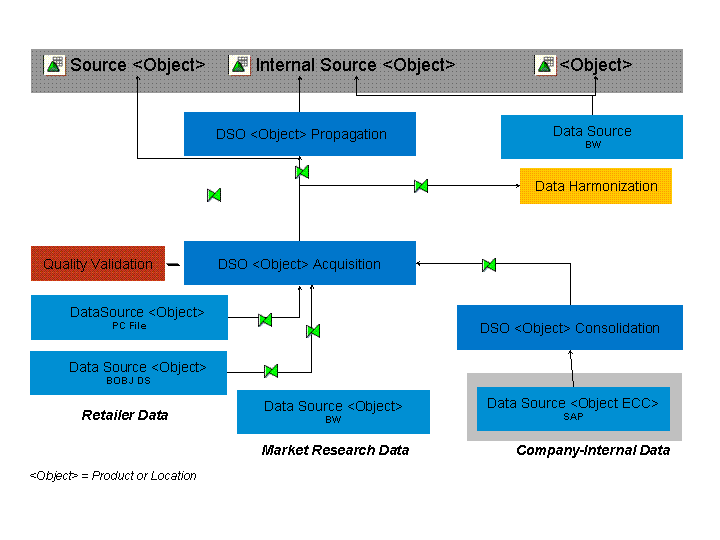
Simplified Overview of Data Flow for Master Data