Transformation of Data Records into
Lists
Transformation of Data Records into
Lists 
Use
Using
the transformation  Transform Data Record into List, you
can transform repeat columns in a table into several rows. Here the system
generates several records in the output table for each individual data record
in the input table.
Transform Data Record into List, you
can transform repeat columns in a table into several rows. Here the system
generates several records in the output table for each individual data record
in the input table.
This transformation is similar to transposition of a table. During transposition, rows and columns in the whole table are swapped. This transformation, however, only transposes selected columns in the table; the other columns are transferred without changes.
Functions
The type of input column should concur with the type of transposition field. The field content is transferred with ABAP-MOVE logic and converted as needed. If conversion is not possible, for example because the FLOAT value 1.00E30 is to be transferred into a decimal field of length 10, it causes the analysis process to terminate due to overflow.
Activities
1. On the Definition tab page, select the fields to be transformed. These are the fields that are to be filled by the transformation. In the example below, these are the columns Answer Question 1, Importance Question 1, Answer Question 2, Importance Question 2, Answer Question 3 and Importance Question 3. The Questionnaire characteristic is transferred unmodified. These columns are deleted from the output structure.
2. On the Transformation tag page, define the transformation field. The new column that adds the characteristic value to the column name is also defined here (with name, description and InfoObject for type). In the example below, this is the new column Question No..
3. Also define at least one transposition field on the Transformation tab page that is to be filled by the transformation. The fields defined here are inserted into the output structure of the node. In the example, these are the new columns Answer and Importance.
4. With the previous steps, you described the new output structure. Now the transformation rules that describe how the field contents are to be transferred from the old into the new structure are missing.
On the Details tab page, for each field from the original data record, specify the row and column in the output table into which the value is to be placed. The row is specified with a characteristic value for the transformation field and the column through the selection of a transposition field.

For the column Importance Question 1, the characteristic value 1 is entered for the characteristic value of Question No. and for the column, the new column Importance is entered.
Example
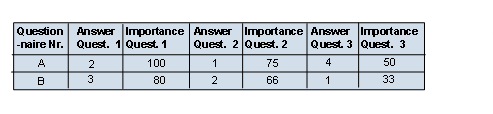
The answers to a questionnaire are available in table form. The table contains all of the answers to the questionnaire by line:
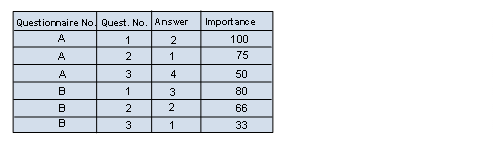
For the following process, this table should be put into a format in which each data record contains the answer and importance of one question. When executing the analysis process, a part of the column name (question 1/question 2/question 3) is converted into a characteristic value for a new column Question No.. The repeating fields Answer and Importance are transferred into the new columns Answer and Importance: