 Bookshop Structure

Bookshop Structure
Unlike the online bookshop without MVC, this bookshop is structured so that book searches, results lists and the detailed displays are summarized on one page.
You can use this to clearly show how the MVC programming model "thinks".
If you call the URL hidden behind the main controller in the browser, the following page is displayed:

Tha main controller
bookshop.do calls view default.htm.This contains a page fragment, which represents the bookshop header (like Tutorial 3 but with HTMLB), as well as 3 HTMLB trays, which call the corresponding controllers.
The following graphic highlights the structure.
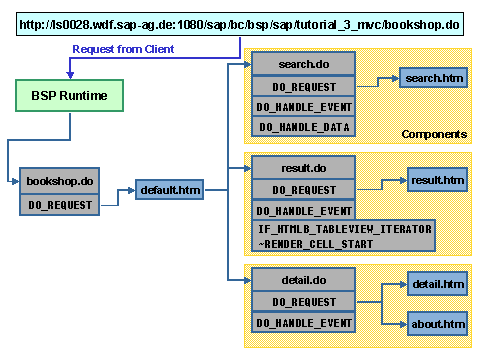
The URL is recognized by the SAP Web AS as a BSP application and is processed by the BSP runtime. This calls main controller
bookshop.do up first, that is, method DO_REQUEST for the corresponding controller class is executed. This then calls the main view default.htm, which in turn uses <bsp:call> element within HTMLB trays to call sub-controllers search.do, result.do and detail.do. These sub-controllers have views that they call.
You can now get going with the implementation!
Creating BSP Applications, Controllers and Views