
 Examples for Jumping to Web Pages
Jump to CNN Money
You want to display the price of a customer’s stocks in a query. Goto the CNN Money Web page from the customer’s context menu.
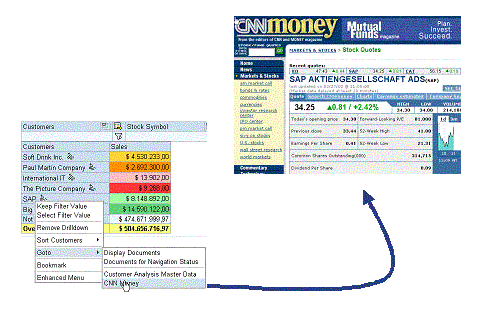
Query definition:
Add the characteristic Stocks Search Item, which is a navigation attribute of Customer, to your query. You have to be able to drilldown to this characteristic in the query. It is transferred as a parameter when the report-report interface is called. Set the properties of the characteristic so that it is not to be displayed.
You have to define the characteristic Stocks Search Item so that the key of the characteristic transfers the exact search item.

No text can be transferred, only the key.
In this case, the three-character long acronym for the company is transferred:

The length of the characteristic has to be defined as three characters long. Otherwise all preceding spaces are filled with zeros.
Determining the Web address and field name:
To jump to the Web page with the search item, you need the Wed address of the page that is referred to in the input field of the stocks search item and the name of the input field.
You have two options:
...
1. Look at the HTML code for the Web page:
This is the appropriate section from the source code for the CNN Money Web page. The required parameters are highlighted in red. The URL that sends the data is after the tag form. The naming of the expected parameter comes after the tag input, in the attribute name.
<form action="http://quote.money.cnn.com/quote/quote" method="get">
<td width="60" valign="bottom">
<img src="http://i.cnn.net/money/images/searchbar/enter_symbol.gif" alt="" width="49" height="16" hspace="3" vspace="0" border="0"></td>
<td width="55" valign="bottom">
<input type="text" name="symbols" value="" size="5" maxlength="38" style="font-size: 11px"></td>
...
2. Execute the action on the Web page with a stocks search item. On the Web page, enter SAP, for example, in the search field and press enter. Copy the URL from the new window:
http://quote.money.cnn.com/quote/quote?symbols=SAP
You will see the query string after the question mark. All parameters name=value are listed here. Single parameters are separated by &.
Sender-receiver assignments:
Proceed as in Creating A Web Address as a Receiver. Specify the Web address that was determined previously http://quote.money.cnn.com/quote/quote.
In the assignment details for the InfoObject Stocks Search Item, specify the field name that was determined previously, SYMBOLS. You can set the Required Entry indicator so that the Web page is only ever called if the stocks search item is found on the Web page.
Enter CNN Money as the title of the report.
Jump to Googleä
You want to research information on the Internet in a query for a customer. Goto the Googleä search engine from the customer’s context menu.
Query definition:
Define your query as described above with a characteristic that has the search item as its key.
Sender-receiver assignments:
Proceed as in Creating A Web Address as a Receiver. Determine the Web address that links to the entry field for the search as described above. In this case it is: http://www.google.com/search?. Enter Google as the title of the report.
Enter q as the field name in the assignment details. This is the name of the entry field that you have already determined as described above. The key of the corresponding InfoObject is transferred to the Web page when the report-report interface is called.