Cache Data Removal and Swapping
You can display information on current memory consumption by clicking on Main Memory for the Cache Monitor.
The following table offers an overview of the individual specifications:
Runtime objects table
|
Specification |
Meaning |
|
Maximum cache size |
200MB by default |
|
Current cache size |
Sum of the size of all cache structure elements in KB (see Cache Structure, Bytes column) |
|
Current swap size |
Size of background store (flat file or cluster table) in KB |
|
Cache reserved |
Ratio between maximum cache size and current cache size in % |
|
Current entries, total |
Sum of current cache entries and current swap entries |
|
Current cache entries |
Number of all cache entries (cache structure elements). See Cache Structure |
|
Current swap entries |
Number of all entries in the background store |
Shared Memory table
|
Specification |
Meaning |
|
Buffer poll time |
Time when buffer capacity was last read |
|
Buffer reserved |
Degree
to which the cache memory is used in % This value is the same as the minimum
free bytes and/or free directory entries If you want to look at these
restricting sizes in greater detail, choose |
|
Buffer capacity cache |
Specification, what proportion of the shared buffer is occupied by the cache |

When the capacity of the cache (the maximum cache size) is exhausted but more data is to be written to the cache, the following solutions are available:
· Data is displaced (deleted) from the cache. See Cache Mode Main Memory Cache Without Swapping (1)
· Data is swapped from the cache and stored in a background memory (swap). See Cache Mode Main Memory Cache With Swapping (2)
The following section outlines the basic principle of both procedures using status diagrams:
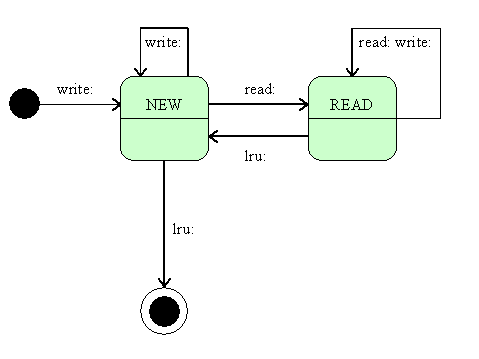
Principle: Caching with Displacement (Main Memory Cache without Swapping)
When data is written to the cache, the entry has the status NEW. (A new write receives this status).
When data is written from the cache, the entry has the status READ. (A new read and write receives this status).
The LRU replacement mechanism starts as soon as the cache memory capacity has been exhausted. This checks the status of entries and removes the entry that was last read the longest time ago.
- When the LRU algorithm comes across an entry with the status READ, it resets it to NEW.
- When the LRU algorithm comes across an entry with status NEW, it makes sure that this entry is overwritten with the new data. If you need to access the overwritten data again afterwards, this data must be read from the database again (cache miss).
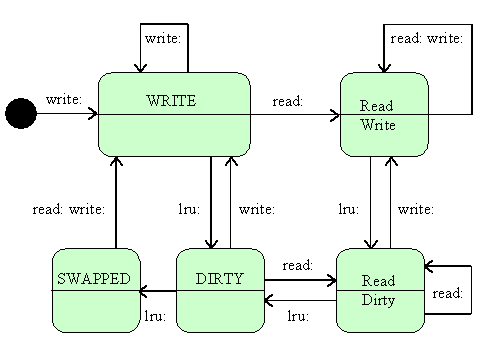
Principle: Caching with Storage in a Background Store (Swap) (Main Memory Cache with Swapping)
When data is written to the cache, the entry has the status WRITE. (A new write receives this status).
When data is written from the cache, the entry has the status READ WRITE. (A new read and write receives this status).
The LRU replacement mechanism starts as soon as the cache memory capacity has been exhausted. This checks the status of entries and removes the entry that was last read the longest time ago.
- When the LRU algorithm comes across an entry with the status READ WRITE, it resets it to READ DIRTY. (A new read receives this status). A new write returns the status of the entry to READ WRITE. The DIRTY flag serves as a “lookout”, making sure that this entry is persisted.
- When the LRU algorithm comes across an entry with the status READ DIRTY, it resets it to DIRTY. The LRU algorithm does the same with entries having the status WRITE that are not read. (A new read resets the entry to the status READ DIRTY, a new write to the status WRITE).
- When the LRU algorithm comes across an entry with status DIRTY, it makes sure that this entry is stored in the background memory and indicated as SWAPPED. If the data needs to be subsequently accessed again, the data can be read from the background memory. At the same time, a new caching entry is created having the status WRITE.
After having run through the entries a maximum of two times, the LRU algorithm, by resetting the flags, has found an entry that can be overwritten.