
 Testing Security Settings
Use
Once you have gone through the checklist for the configuration of the security function and the ICM, you should test your settings.

With SAP Web AS 6.20 Support-Package 23 the logon application SYSTEM contains a test page sso2test.htm, which you can use to check that the SSO2 settings are correct. Simply open the page in the browser and follow the instructions.
The test must be successfully completed for the SYSTEM application to work properly.
Background

The initial situation is represented as follows:
Step 1 |
When a URL is called (such as a page of a BSP application), the browser sends a GET request to the server. The server does not have any authentication information and therefore requests it (return code 401). |
It displays a dialog box in the browser, requesting the user name and password. |
|
Step 2 |
As soon as the user has been authenticated using this data (basic authentication), the information is specified in the header with the next GET request. |
The server therefore recognizes that the user is authorized to display the URL and therefore displays the page contents (return code 200). It is also possible that the server sends additional SSO2 information, although this cannot be verified.
As soon as basic authentication has been used once, it is always user afterwards. |
|
Step 3 |
If a different URL is now called (such as a page of a different BSP application), this means that an additional GET request is sent to the server with a new URL. The basic authentication information is also sent with the header. Theoretically, SSO2 information can also be specified, but again this cannot be verified. |
Due to the basic authentication information, the requested page is always displayed in the browser (return code 200). |

It is not possible to find out here whether SSO2 information is transmitted, or whether SSO2 is used at all. You must therefore suppress basic authentication in the following test scenario.
Test scenario
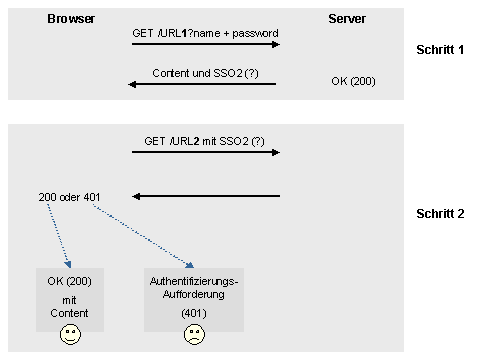
The test scenario is as follows:
Step 0 |
All browser windows are closed in order to get rid of all previous basic authentication information. |
Step 1 |
Server authentication is then enforced without using basic authentication. This is done by transferring the name and password directly to the first URL. |
The contents of the URL are returned (return code 200) as well as – hopefully – the SSO2 information. |
|
Step 2 |
A new GET request is now sent to the server. With this second URL, however, the name and password are not explicitly transferred. Instead, this information is implicitly available in the SSO2 cookie if everything is running correctly. |
The system returns either return code 200 or return code 401: · If SSO2 is working, then return code 200 is sent and the content is displayed in the browser. · If, however, SSO2 is not working correctly, then return code 401 is sent with an authentication request, since the server does not have any authentication information and must explicitly request this first. |
Procedure
...
1. Close all browser windows.
2. Select a BSP application for testing, such as BSP application TUTORIAL_1.

Ensure that this is not a BSP application that has an anonymous display user in Transaction SICF.
3.
Select a
page of this BSP application that you want to execute for the test and call it
up in a browser.
Example of a
page:http://ls0028.wdf.sap-ag.de:1080/sap/bc/bsp/sap/tutorial_1/default.htm
4. Choose Cancel for the authentication query that follows.
5.
Now manually
extend the URL in the browser with the user name and password data.
Example of another URL:
http://ls0028.wdf.sap-ag.de:1080/sap/bc/bsp/sap/tutorial_1/default.htm?sap-client=000&sap-user=testuser&sap-password=test
6. Choose Enter.
The browser displays the page you requested.
7. Now choose a different BSP application whose page you want to display for the test, and enter the corresponding URL in the browser.
Ensure that
this too is not a BSP application
that has an anonymous display user in Transaction SICF.
This time do not enter the user
name and password information.
Example of a page:http://ls0028.wdf.sap-ag.de:1080/sap/bc/bsp/sap/tutorial_3/default.htm
8. Choose Enter.
Result
Two cases can occur as a result:
·
The
application is displayed correctly (return code 200).
The security settings (SSO2) in your SAP Web AS System are configured
correctly.
·
The
application is not displayed, instead you receive return code 401
(authentication request).
In this case, you should check the settings for security and for the ICM in
your system (see Prerequisites).