 Creating View result.htm for the Results List

Creating View result.htm for the Results List
Use
This view should display the results of the search in an HTMLB table view. If an entry in the table is selected, detailed information about this book should be displayed underneath.
Procedure
You can implement the view layout as follows:
|
<%@page language="abap" %> <%@extension name="htmlb" prefix="htmlb" %> <htmlb:textView text = " <%= page->messages->assert_message( 'isbn' )%> "textColor = "red" wrapping = "FALSE" /> <htmlb:textView text = " <%= page->messages->assert_message('internal' ) %> "textColor = "red" wrapping = "FALSE" /> <htmlb:tableView id = "result" design = "ALTERNATING" headerText = "Header Text" onNavigate = "onMyNavigate" selectionMode = "SINGLESELECT" emptyTableText = "No books were found to match your query!" onRowSelection = "onMyRowSelection" table = " <%= bookcat_tab %>"iterator = " <%= iterator %>"visibleRowCount = "5" > <htmlb:tableViewColumns> <htmlb:tableViewColumn columnName = "title" width = "100" horizontalAlignment = "left" title = "Title" > </htmlb:tableViewColumn> <htmlb:tableViewColumn columnName = "subtitle" width = "100" horizontalAlignment = "left" title = "Subtitle" > </htmlb:tableViewColumn> <htmlb:tableViewColumn columnName = "authors" width = "100" horizontalAlignment = "left" title = "Autor" > </htmlb:tableViewColumn> <htmlb:tableViewColumn columnName = "delivery" width = "100" horizontalAlignment = "center" title = "Delivery" > </htmlb:tableViewColumn> <htmlb:tableViewColumn columnName = "our_price" width = "100" horizontalAlignment = "center" title = "Our Price" > </htmlb:tableViewColumn> <htmlb:tableViewColumn columnName = "catal_curr" width = "100" horizontalAlignment = "left" title = "Currency" > </htmlb:tableViewColumn> </htmlb:tableViewColumns> </htmlb:tableView> |
Messages are assigned first of all in case an invalid ISBN is entered or an internal error occurs. See Tutorial
Further Developing the Bookshop (section Changing the Search Page) for more information about this. The messages are created in method DO_HANDLE_EVENT of Controller search.do.The table is designed so that exactly one row can be selected. If you do this by clicking on it, this triggers the HTMLB event that is being processed in method
DO_HANDLE_EVENT.If the table is empty (either the first time it is accessed or because nothing was found), instead of entries it contains the text
No books were found to match your query!.Table
bookcat_tab for the books that are found and the iterator for rendering the author column (see Processing Custom Rendering for the Author Column) are specified as attributes.The required field tables are then defined as columns: Title, Sub-Title, Author, Delivery, Price and Currency.
Result
The first time you access the results you see the following table:

If books were found, the table looks like this:
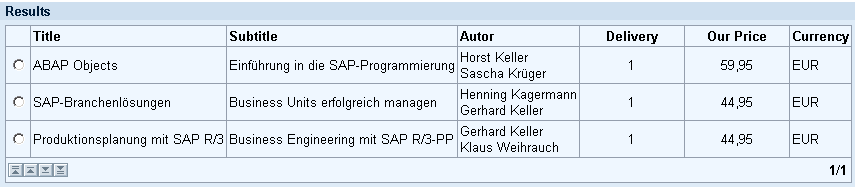

Now go to the detailed display for the selected book:
Creating Controller detail.do for the Detail Display