
 Intervals
Use
Under both postable and not postable nodes you can hang an interval instead of a quantity of leaves. An interval includes a quantity of characteristic values for the hierarchy basic characteristic and is defined by its lower limit (the From-<Characteristic Value>) and its upper limit (the To-<Characteristic Value>). Since an interval corresponds to a quantity of leaves, you cannot hang additional objects under an interval. (You can find additional information about the individual hierarchy nodes under Hierarchy Nodes.)
Functions
In the InfoObject maintenance, you
define whether intervals in hierarchies are permitted for the hierarchy basic
characteristic (see  Tab Page:
Hierarchy).
Tab Page:
Hierarchy).
In the hierarchy maintenance you model the hierarchy with intervals, if necessary.
If you add an interval into a hierarchy in the hierarchy maintenance, the system creates a node for the artificial characteristic 0HIER_NODE. This node represents the interval. The limits of the interval are entered in the hierarchy table /BI*/H<IOBJNM>, which is generated for each hierarchy basic characteristic, into fields LEAFFROM and LEAFTO. The description of the interval is comprised of the description for the characteristic values selected for these fields.
You can also create intervals for such characteristic values for which no master data has yet been posted. If you post new data for the respective characteristic values, the system automatically arranges these. In this way you can avoid having to enhance the hierarchy when accessing master data again.
In reporting, an interval is not displayed as a node, but rather is triggered: All leaves, which are in the interval and for which data is posted in the InfoProvider, are displayed.
Example
Example 1 – Cost element hierarchy
In a hierarchy for InfoObject Cost Element (0COSTELMNT), you want to add cost elements 100 to 1000 as an interval under the node Material Costs. Until now, your BW system posted for the hierarchy basic characteristic only the characteristic values 100 to 500 in the InfoProvider.
...
1. Create the text node Material Costs.
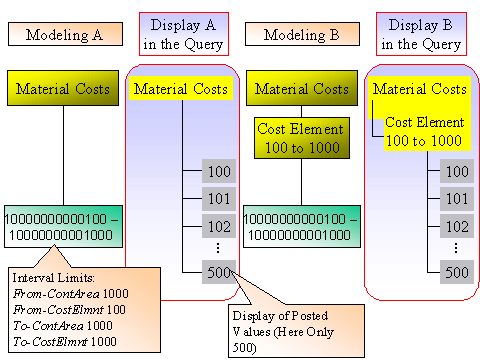
2. You can create the interval directly under the node Material Costs. In this case, the leaves for the individual cost elements are likewise displayed directly under the node Material Costs in the query.

However, if you also want to see a node in the query that assembles the cost elements included in the interval, you can then create a Cost Element 100 to 1000 text node under the node.
This way of modeling intermediate nodes is also suitable, for example, for a customer hierarchy in which you cannot see all customers at the same time, but rather the display shows groups, such as Customers A-C and Customers D-F.
3. Under the parent node Material Costs (or Cost Element 100 to 1000), create an interval for InfoObject Cost Element.
4. Specify the interval limits in the dialog window Create Interval. Since the InfoObject Controlling Area (0CO_AREA) is compounded for the InfoObject Cost Element (0COSTELMNT), the specification of the controlling area you want is also required here. Example:
From-ContArea 1000
From-CostElmnt 100
To-ContArea1000
To-CostElmnt1000
Long Description 10000000000100 – 10000000001000
The Node Level corresponds to the place where you add the interval.
If the interval nodes (or a part of the values) in the hierarchy already exists, you receive a Warning: Duplicate Nodes. Usually, the user does not want values to occur multiple times in a hierarchy. However, you can decide for yourself if the system needs to transfer the duplicate nodes or not. (The latter is the default setting.)
In the query, the leaves with values 100 to 500 are displayed in the cost element hierarchy under the node Material Costs (or Cost Element 100 to 1000). If after a while some cost elements are added with the material costs and you create the master data for the values from 501, the new cost elements are automatically displayed in the query as soon as the transaction data is loaded.
The following graphic shows both types of modeling cost element hierarchies:
Example 2 – Time hierarchy
Another typical example for the use of intervals is the time hierarchy (see Hierarchy Nodes, Example 1).
See also: