References in a Payment Item
In the dialog mode, you can use the references in a payment item to go to the associated payment items and payment orders and their data. If there is a posting control order for the payment item, you can use a reference to navigate to the display of the posting control order. If the payment item references an information item, which was generated when a debit turnover was posted, you can navigate to the information item display.
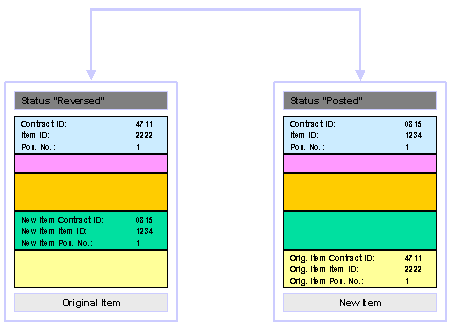
After the reversal of a payment item, the Reversal Reference field is entered. The reversed item contains the reference to the reversal item and the reversal item contains the reference to the reversed item via the contract ID, item ID and position.

After the transfer posting of an (internal) recipient item, the field Transfer Posting of New Item is entered in the original item and the field Transfer Posting of Old Item is entered in the original item.
The original item contains the reference to the new item and the new item contains the reference to the original item via the contract ID, item ID and position.
In the payment order, you enter references
between the payment order and its items: The transfer
posting of a payment item takes place via a payment order that reverses the
posting on the ordering party side in the original account and posts a
recipient item to the new account on the recipient side. The result is the
following Overall View of the References for a Transfer
Posting: The system provides
a reference to the new item only if this is also posted internally in
Account Management (FS-AM). The available
references are also used to navigate to the offsetting posting and the return
order when a payment item is returned; References Between Participating
Objects when Returning via Offsetting Posting or Reversal: The system provides
a reference to the return item only if this is also posted internally in
Account Management. .