
 TextEdit
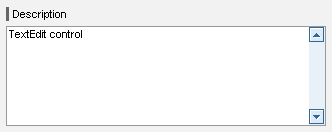
The TextEdit UI element allows the entry and display of a multiple line text. The text in this UI element uses a uniform font, font size, and font style. The UI element is displayed with borders and the frame size is specified by the properties col and row. If the number of rows exceeds the value of the row property, a vertical scroll bar is displayed.
If the value of the wrappingproperty is off, the scroll bar is only be displayed if the text row length exceeds the value of the col property.

When the template is designed there is no check for the tool tip property to guarantee accessibility.
A tooltip does not necessarily have to be set for this UI element, but it could make sense to set it, if it contains detailed semantic information.
Example of the Display of TextEdit with a Label
|
|
Runtime Class |
CL_WD_TEXT_EDIT |
Properties in the View Designer
Name |
Type |
Initial Value |
Bindbar |
ID |
STRING |
(automatic) |
No |
I |
40 |
Yes |
|
WDY_BOOLEAN |
true |
Yes |
|
Text |
|
No |
|
STRING |
|
Yes |
|
WDY_BOOLEAN |
false |
Yes |
|
I |
5 |
Yes |
|
WDUI_STATE |
normal |
Yes |
|
WDUI_TEXT_DIRECTION |
inherit |
Yes |
|
Text |
|
Yes |
|
STRING_TABLE |
|
Mandatory |
|
WDUI_VISIBILITY |
visible |
Yes |
|
STRING |
|
Yes |
|
WDUI_TEXT_WRAPPING |
soft |
Yes |
Further properties that can be inherited are defined in the associated higher-level class. The associated interface elements are:
Dynamic Programming
For dynamic programming the same properties, events, and aggregations are provided in the View Designer. Bear in mind the different spellings.
Dynamic Programming of Properties
View Designer Name |
Runtime Name |
Type |
COLS |
I |
|
ENABLED |
WDY_BOOLEAN |
|
EXPLANATION |
WDY_MD_TRANSLATABLE_TEXT |
|
HEIGHT |
STRING |
|
READ_ONLY |
WDY_BOOLEAN |
|
ROWS |
I |
|
STATE |
WDUI_STATE |
|
state: normal |
CL_WD_TEXT_EDIT=>E_STATE-NORMAL |
|
state: required |
CL_WD_TEXT_EDIT=>E_STATE-REQUIRED |
|
TEXT_DIRECTION |
WDUI_TEXT_DIRECTION |
|
textDirection: inherit |
CL_WD_TEXT_EDIT=>E_TEXT_DIRECTION-INHERIT |
|
textDirection: ltr |
CL_WD_TEXT_EDIT=>E_TEXT_DIRECTION-LTR |
|
textDirection: rtl |
CL_WD_TEXT_EDIT=>E_TEXT_DIRECTION-RTL |
|
TOOLTIP |
WDY_MD_TRANSLATABLE_TEXT |
|
VALUE |
STRING_TABLE |
|
VISIBLE |
WDUI_VISIBILITY |
|
visible: none |
CL_WD_TEXT_EDIT=>E_VISIBLE-NONE |
|
visible: visible |
CL_WD_TEXT_EDIT=>E_VISIBLE-VISIBLE |
|
WIDTH |
STRING |
|
WRAPPING |
WDUI_TEXT_WRAPPING |
|
wrapping: hard |
CL_WD_TEXT_EDIT=>E_WRAPPING-HARD |
|
wrapping: off |
CL_WD_TEXT_EDIT=>E_WRAPPING-OFF |
|
wrapping: soft |
CL_WD_TEXT_EDIT=>E_WRAPPING-SOFT |
|
Example
You can find examples in the system in the Web Dynpro application, WDR_TEST_UI_ELEMENTS.