Exchanging Metadata in XMI Format
Use
In order to exchange metadata (BI objects) between different systems, you can use XMI in the Transport Connection functional area of the Data Warehousing Workbench (XML Metadata Interchange). A model derived along the lines of the CWM (Common Warehouse Metamodel) is used.

For more information about the CWM standard, see the Object Management Group homepage (www.omg.org) on the Internet.
For more
information about the Transport Connection functional area of the
Administrator Workbench, see  Transport Systems.
Integration
You can export or import the XML files (Download or Upload to/from PC) in the Data Warehousing Workbench.
An ICF Service is also available to you under sap/bw/xml/cwm. You can use this HTTP service to request this metadata in the same way as in the Web server.
In order to request metadata for an object, use the following URL:
<Protocol>://<Server>:<Port>/sap/bw/xml/cwm?/
CLASSID=<Class>&ID=<Name>&DETAIL=X&OBJECTVERSION=A
The following table lists the information that you need to replace the placeholders with:
Components of the URL
Placeholder |
Information |
<Protocol> |
http or https |
<Server>:<Port> |
Specify the name of the server and the port for the required BI system.
http://ls0027.wdf.sap-ag.de:1080/ For more information, see ICF Services in SAP BW. |
<Class> |
Specify the name of the class for the required BW object.
Example for the class InfoCube: CLASSID=COM.SAP.BW.CWM.OLAP.INFOCUBE
You get the BI model in XML format from the following URL: http://<Server>:<Port>/sap/bw/xml/cwm? |
<Name> |
Specify the technical name for the required BI object.
You get an overview of all objects from the URL: http://<Server>:<Port>/sap/bw/xml/cwm? The parameter &OBJECTVERSION=D gives you an overview of all Business Content objects, namely: http://<Server>:<Port>/sap/bw/xml/cwm? You get an overview of all objects of a specific type by using the ID specification in the URL.
For example, you enter the following for InfoCubes: http://<Server>:<Port>/sap/bw/xml/cwm? |

Features
The exchange of metadata involves:
 Importing from another system
 Exporting into another system

Those objects for which there are BAPIs (Business Application Programming Interfaces) are supported with details. If you want an overview of the object types in your system that have BAPIs available, choose BAPI Explorer (Transaction BAPI) ® Hierarchical ® SAP Business Information Warehouse ® Warehouse Management.
You can only import these objects after you have changed them. Presently you are only able to import BI objects.
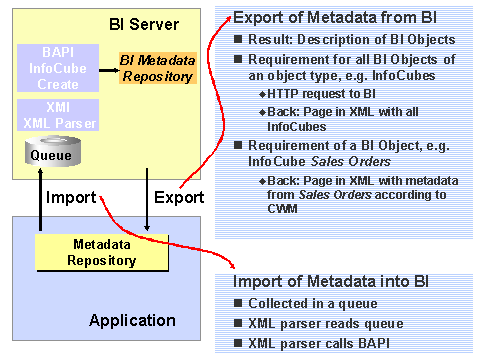
You can export the current BI model according to the XMI (XML Metadata Interchange) standard. This is made possible with the SAP report RSO_REPOSITORY_EXCHANGE_XML.
For more information about the XMI standard, see the OMG homepage (www.omg.org).
The following image illustrates the functions EXPORT and IMPORT.