
 Analysis Process Designer
Use
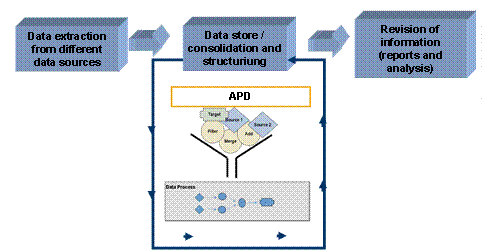
In the BI system data is collected from the heterogeneous databases in the various systems that the enterprise is using and is consolidated, managed, and staged for evaluation purposes. There is often further, valuable potential in this data.
This is completely new information that is displayed in the form of meaningful correlations between data but that is too well hidden or complex to be discovered by simple observation or intuition.
The Analysis Process Designer (APD) allows you to find and identify these hidden or complex relationships between data in a simple way. Various data transformations are provided for this purpose, such as statistical and mathematical calculations, data cleansing and structuring processes.
The results of the analysis are saved in BI InfoProviders or in CRM systems. They are available for all decision and application processes and thus can be decisive (strategically, tactically, and operatively).
Examples of analysis processes include the calculation of ABC classes, determination of frequency distribution or of scoring information.
Integration
The Analysis Process Designer is the application environment for the SAP data mining solution. The following data mining functions are integrated into the APD:
· Creating and changing data mining models
· Training data mining models with various BI data (data mining model as data target in the analysis process)
· Executing data mining methods such as prediction with decision tree, with cluster model, and integration of data mining models from third parties (data mining model as a transformation in the analysis process)
· Visualizing data mining models
For more information, see Data Mining.
The APD is integrated into the Data Warehousing Workbench:
Constraints
The following restrictions apply to the integration into the Data Warehousing Workbench:
· The node texts are not language dependent.
· You can only integrate an analysis process into a process chain using the process type ABAP program. To do this, choose the ABAP report RSAN_PROCESS_EXECUTE.
· Analysis processes are not displayed in the data flow display.
· The where-used list only functions from the analysis process to other objects and from data mining models to the analysis process, not from other objects such as InfoProviders.
Features
The Analysis Process Designer is a workbench with an intuitive graphic user interface for the creation, execution, and monitoring of analysis processes. Analysis processes can be created using Drag&Drop. Data from different data sources in the BI system can be combined, transformed, and staged for analysis in several individual steps so that it can be resaved in data targets in the BI system (DataStore objects for direct update or InfoObjects with attributes), or in a CRM system. Available to you are various
· Transformations and
Various additional functions support you in modeling and executing an analysis process, as well as in interpreting the analysis results. See also Checking Data.
The following graphic shows the various steps in the Analysis Process Designer.
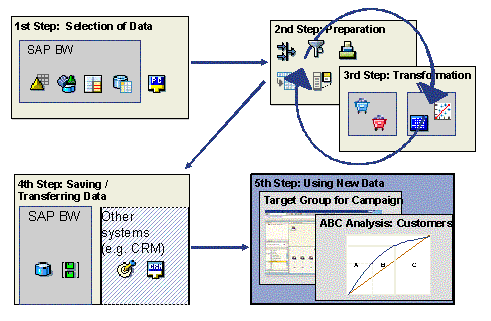
First select a data target that contains the required data. This data is then staged and transformed. The transformed data is saved in a BI object or in another system. For analysis, you can display the data in a query in the Business Explorer.
For more information, see Modeling an Analysis Process.
Versioning
Analysis processes are integrated into the versioning concept (active, inactive version, content version and delivery).
Transport Connection
Analysis processes
are connected to the BI transport system as TLOGO
objects. For more information, see  Transport
Systems.
Transport
Systems.