
 BI Integrated Planning
Purpose
The BI integrated planning provides business experts with an infrastructure for realizing and operating planning scenarios or other applications. Planning covers a wide range of topics, ranging from the simple input of data to complex planning scenarios. In contrast to BW-BPS (Business Planning and Simulation), this solution is fully integrated into the BI system.
Integration
The following tools are available for modeling planning scenarios:
· To create the data basis, use the Data Warehousing Workbench.
· To model all the planning-specific metadata objects, use the Planning Modeler. The planning modeler is a Web-based application that is installed on J2EE Engine.
· To define an input-ready query for the manual entry of plan data, use the BEx Query Designer.
· To configure Web templates, use the BEx Web Application Designer; to configure Excel applications, use the BEx Analyzer .
In this way, you can use the Data Warehousing Workbench and all the tools of the Business Explorer to analyze, plan and enter data.
The following graphic provides an overview of the architecture:
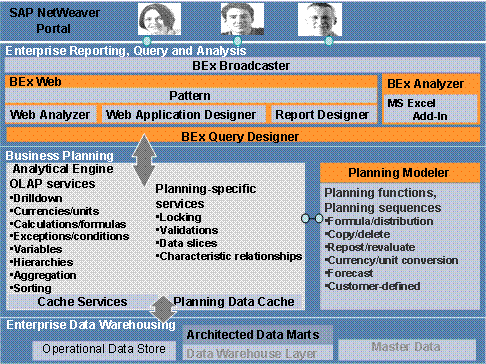
Features
The planning model incorporates:
· Data (stored in InfoCubes)
· (Structuring) views of data (aggregation levels, MultiProvider, characteristic relationships, if necessary).
· Methods to change data (planning functions, planning sequences, manual planning in the form of queries ready for input, in addition to process chains).
· Utilities (filters that can be used in queries and planning functions; variables used to parameterize objects that can usually be used where selections are used, for example, in data slices)
· Concepts for (where applicable, time-restricted) central protection of data (data slices)
The most important concepts and terminology for the planning model for BI integrated planning are discussed in the next section.
Data Basis and Lock Concept
Real-time InfoCubes are used to store data.
To ensure that one user only is able to change data, “their” data is locked and cannot be changed by other users. Depending on the expected load (determined by the number of users working in parallel and the complexity of the selection), different implementations of the lock process are available. The lock algorithm is used by BW-BPS and BI integrated planning.
Modeling in the Planning Modeler
In the planning modeler, you edit the following objects of the planning model:
· Aggregation Levels
To determine the level on which data can be entered or changed (manually through user input or automatically by a planning function), an InfoProvider of type aggregation level has to be defined. An aggregation level consists of a subset of the characteristics and key figures of a MultiProvider or real-time InfoCube. Real-time InfoCubes are used to store data.
· Characteristic Relationships
You can use characteristic relationships to model semantic relationships between characteristics (such as product group and product). In this way you check, for example, whether a particular combination of characteristics can be generated (if this combination is permitted) or whether a cell is input ready. Characteristic relationships are created for an InfoCube.
· Data Slices
You use data slices to protect whole areas of data globally against changes (for example, current values or historic values).
· Planning Functions
Planning functions allow system-based processing or generation of data. The BW-BPS function types are provided as standard. Functions can be executed immediately (using the pushbutton) or in the background as a planning sequence.
· Planning Sequences
A planning sequence is a sequence of planning functions and manual input templates that are executed sequentially. You can also schedule planning sequences to be processed in the background as a step in a process chain.
· Filters
A filter describes a section of a dataset which is processed, for example, in a query or a planning function. (For example, calendar year 2004 – 2005, customer group XY).
· Variables
Variables can be used in various places; in the filter for selections of characteristic values that can be parameterized, to parameterize planning functions or planning sequences.
Input-Ready Query
A query that is defined for an InfoProvider of type aggregation level. It is input ready and can be used for manual planning. Whether a particular cell is input ready depends on the drilldown, specifically whether characteristic relationships and data slices are permitted for the cell.
Complex Planning Applications
In the BEx Analyzer and Web Application Designer you can build planning applications that support both manual and automatic data entry and changes.