 Creating View search.htm for the Search

Creating View search.htm for the Search
Use
View
search.htm is the part of the page that provides input fields for the book search.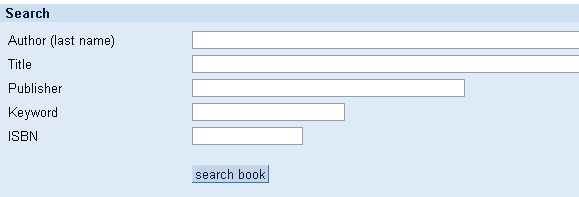
Procedure
The view layout looks as follows:
|
<%@ page language="abap" %> <%@ extension name="htmlb" prefix="htmlb" %> <table> <tr><td width="180"> <htmlb:label for="author" text="Author (last name) "/></td> <td><htmlb:inputField id="author" size="80"/></td> </tr> <tr><td width="180"> <htmlb:label for="title" text="Title "/></td> <td><htmlb:inputField id="title" size="80"/></td> </tr> <tr><td width="180"> <htmlb:label for="publisher" text="Publisher "/></td> <td><htmlb:inputField id="publisher" size="40"/></td> </tr> <tr><td width="180"> <htmlb:label for="keyword" text="Keyword "/></td> <td><htmlb:inputField id="keyword" size="20"/></td> </tr> <tr><td width="180"> <htmlb:label for="isbn" text="ISBN "/></td> <td><htmlb:inputField id="isbn" size="13"/></td> </tr> <tr><td></td><td height="50"><htmlb:button id="searchbutton" onClick="search" text="search book"/></td></tr> </table> |
The coding is different from the search page in
Our First Online Bookshop in that the input fields are HTMLB input fields that have HTMLB labels. These labels are required for input processing and to control event handling.You must now create these attributes as page attributes of the view.
Choose the Page Attributes tabstrip and then enter your attributes:
|
Attribute |
Type |
Reference Type |
Description |
|
author |
TYPE |
STRING |
The author specified by the user |
|
isbn |
TYPE |
STRING |
The ISBN specified by the user |
|
keyword |
TYPE |
STRING |
The keyword specified by the user |
|
publisher |
TYPE |
STRING |
The publisher specified by the user |
|
title |
TYPE |
STRING |
The title specified by the user |
Result
You have now programmed the view that enables users to search for a book.
If the user chooses Search Book, this triggers the OnClick="search" event. This is processed in controller
search.do (see also Creating Controller search.do for the Search).
Now create the controller for the results list
result.do: Creating Controller result.do for the Results List.