
 Application Programming Interface
(API)
Application Programming Interface
(API) 
Definition
The BW-BPS application programming interface comprises a large number of functions that you can use to access the BW-BPS planning objects and functions from your own applications.
Use
The BW-BPS application programming interface enables you to provide program interfaces created by you, orientated towards the end user, with the functionality of BW-BPS. As a result, you connect the efficiency of BW-BPS with the simple operation of a familiar interface, for example Microsoft Excel or a Web application.
You can offer the users of the applications you have created a subset of planning functionality determined by you, where the use of the functionality can take place completely transparently. This means that BW-BPS works together “invisibly” with your application. An advantage of this is that your users to not have to learn how to use BW-BPS.
The following graphic shows a typical sequence of access to the application programming interface. As a client application which accesses the interface, a self-defined transaction is accepted with the appropriate programs, which can display plan data in a separate table that is ready for input (for example ALV grid control). The purpose of this application is to execute a simple revaluation, and to offer the possibility of manual data change.
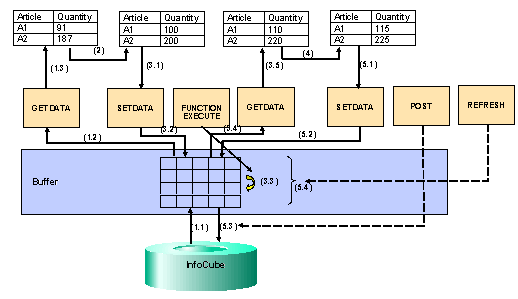
The numbers in the graphic describe the following steps:
...
1. Data collection from the data basis.
When the function API_SEMBPS_GETDATA is first called up, the BW-BPS buffer storage is empty. Therefore, the function reads the data directly from the InfoCube that the addressed planning area is assigned to (1.1). It prepares the values corresponding to the planning layout transferred as a parameter, automatically fills the buffer with the read data, and transfers the data into the table that is ready for input (1.3).
2. Manually changing plan data
The user of the client application changes the values in the table that is ready for input. Subsequently he or she chooses one of the functions “Percentage Increase” offered by the application, with which the current value should be increased by 10%.
3. Revaluation
The function “Percentage Increase” of the client application (3.1) is designed so that the data currently displayed with the function API_SEMBPS_SETDATA is written into the buffer storage managed by BW-BPS. Subsequently with a corresponding parameterized call of function API_SEMBPS_FUNCTION_EXECUTE, the desired revaluation is executed (3.3). The actual revaluation is not carried out by the interface function. Rather, this calls up a planning function of the type Revaluation, which was created before in the planning environment under entry of a parameter group, and which contains the revaluation factor (10%). The values that are increased by 10% are now in the buffer and, by calling up the function API_SEMBPS_GETDATA (3.4), are transferred into the table ready for input (3.5), so that the result of the revaluation is visible. Since at this point data already exists in the buffer, this time the function only accesses the buffer (and not the InfoCube). This is different to the first call (1.1). This way a considerable improvement is achieved in the response time.
4. Manually changing the plan data again
The client application user changes the now increased values again in the table that is ready for input.
5. Exiting the application
Finally the user exits the client application. The application makes sure that the current status of the data from the ready for input table is transferred into the buffer again (5.2) by calling up the function API_SEMBPS_SETDATA. The data found in the buffer is saved permanently in the data basis by a final call up of the function API_SEMBPS_POST. Following the BW-BPS transaction concept, the objects concerned remain locked with access using the API, until the connection to the system is removed (usually by exiting your external application). This normally occurs when you exit your external application. If you want to release the objects earlier, you can do this with the function API_SEMBPS_REFRESH (5.4).
The applications created by you are not restricted to user-defined transactions, reports or other SAP programming objects. Rather, you can also contact the BW-BPS application programming interface from an external PC application using the corresponding SAP technologies. The prerequisite for this is that the external application can take on the role of an OLE Automation Controller. This is, for example, the case for all products of the Microsoft Office family, which have a macro language or an integration with Visual Basic for Applications (VBA) at their disposal.
To make troubleshooting easier when developing your program, BW-BPS offers a special trace function with which you can log the internal function calls of BW-BPS. This function is not integrated into the planning environment; it must be called explicitly with the transaction BPS_TRACE. The following functions are offered to you there:
· User Overview: You can choose, on a user by user basis, whether trace lists should be generated or not. In addition, you receive an overview about all users for whom the trace function is activated.
·
Trace
Overview: You receive an
overview of all traces that are saved in the system. You can sort the trace
list by user or by date/time. By double-clicking on a trace, the content of
the trace is displayed, every call of a function module is displayed in its
own row. With the function  Run Trace, you can run a function call in the debugger,
which is recorded in the trace log, at exactly the time of
recording.
Run Trace, you can run a function call in the debugger,
which is recorded in the trace log, at exactly the time of
recording.
Structure
The application programming interface consists of a large number of functions that are grouped together in the function group UPC_API. The function group contains functions for the following tasks:
· Reading planning architecture objects (planning areas, levels and packages; see Planning Environment), using one of the planning layouts to be transferred as a parameter of manual planning

The planning layout that you want to use as a data source must be configured so that the selection in the header area is clear. Otherwise the system cannot determine which data should be delivered by the interface.
· Reading master data
· Reading and writing transaction data
· Reading from BW characteristic hierarchies (“external hierarchies”, see Hierarchically Structured Planning)
· Reading variables
· Executing planning functions
If you want to use the programming interface not only to display data from BW-BPS but also to change it, use the planning functions defined in the planning environment (instead of local functions within your application). The reason for this is that the data delivered by the API is not passed on unchanged from the data basis, instead it is formatted using a planning layout of manual planning. The settings prevailing in the layout definition regarding scaling factors, decimal places, and reversed credit/debit sign have an immediate effect on the transferred key figure values, without it being recognizable from the external application whether such formatting has taken place or not. In addition, formatting with few decimal places can lead to unnoticed rounding errors.
· Explicit release of all locked objects
You will find more information (for example on the interaction of various functions or the parameter supply) in the system, in the documentation on the function modules of function group UPC_API.
Integration
The BW-BPS programming interface enables the integration of planning functionality in as many other applications as you want. If you want to access the programming interface functions from an external PC application, you can achieve this with the help of the SAP Automation Interface. You can find information on using this service under SAP Automation RFC and BAPI Interfaces. The following objects are of particular interest:
· Logon Control
· Table Control
· Function Control