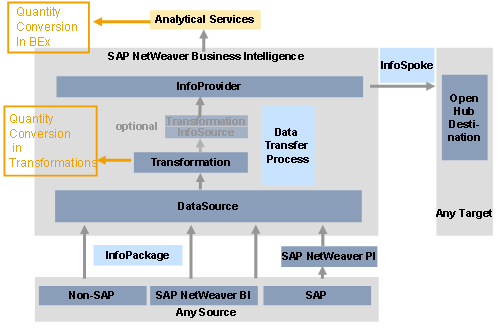
Quantity Conversion
Use
Quantity conversion allows you to convert key figures with units that have different units of measure in the source system into a uniform unit of measure in the BI system.
Features
This function enables the conversion of updated data records from the source unit of measure into a target unit of measure, or into different target units of measure, if the conversion is repeated. In terms of functionality, quantity conversion is structured similarly to currency translation.
In part it is based on the quantity conversion functionality in SAP NetWeaver Application Server. Simple conversions can be performed between units of measure that belong to the same dimension (such as meters to kilometers, kilograms to grams). You can also perform InfoObject-specific conversions (for example, two palettes (PAL) of material 4711 were ordered and this order quantity has to be converted to the stock quantity carton (CAR)).
Quantity conversion is based on quantity conversion types. The business transaction rules of the conversion are established in the quantity conversion type. The conversion type is a combination of different parameters (conversion factors, source and target units of measure) that determine how the conversion is performed. For more information, see Quantity Conversion Types.
Integration
The quantity conversion type is stored for future use and is available for quantity conversions in the transformation rules for InfoCubes:
In the transformation rules for InfoCubes you can specify, for each key figure or data field, whether quantity conversion is performed during the update. In certain cases you can also run quantity conversion in user-defined routines in the transformation rules.
For more information, see Quantity Conversion in Transformations.