
 VirtualProviders with BAPI
Definition
VirtualProviders whose transaction data for reporting is read from an external system using a BAPI.
Use
Using a VirtualProvider, you can carry out reporting using data in external systems without having to physically store transaction data in the BI system. You can, for example, include an external system from market data providers using a VirtualProvider.
The transaction data is managed externally, and not in the BI system. Only the structure of the VirtualProvider is defined in the BI system. By doing this, you can reduce the administrative work on the BI side and also save memory space.
Structure
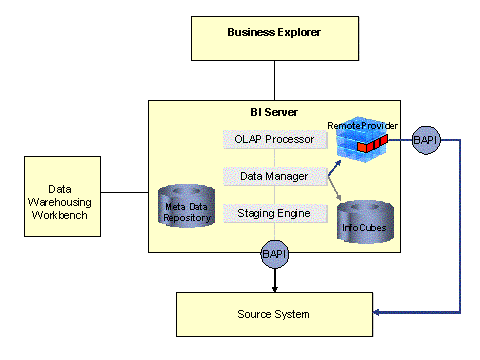
When reporting using a VirtualProvider, the Data Manager, instead of using an InfoProvider filled with data, calls the VirtualProvider BAPI and transfers the parameters.
· Selection
· Characteristics
· Key figures
As a result, the external system transfers the requested data to the OLAP Processor.
Integration
To report using a VirtualProvider with BAPI you have to carry out the following steps:
...
1. In the BI system, create a source system for the external system that you want to use.
2. Define the required InfoObjects.
3. Load the master data.
4. Define the VirtualProvider.
5. Define the queries based on the VirtualProvider.