
 Tree
Tree 
Hierarchies defined in the context can be visualized using the Tree UI element. The hierarchy to be displayed is defined in the context. You can describe this context structure in two ways:
· With a recursive node if the number of levels is not yet known at design time.
· With a non-recursive node if a certain number of levels can be specified at design time.
Example of the Display
|
|
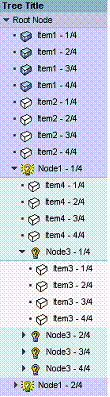
The Tree UI element is bound against the top-level context node to be displayed.
You use nodes (TreeNodeType elements) or leaves (TreeItemType elements) to specify which subnodes are to be displayed and which context atttributes are to be displayed on these subnodes as a text or tooltip. The dataSource property of the TreeNodeType element or TreeItemType element is bound to the corresponding context node and the properties text, tooltip, and so on, are bound to the corresponding context attributes on this context node.
TreeItemType elements cannot have children. Therefore, they are always displayed as leaves. They are used when it is decided at design time that the corresponding node does not have children. When using TreeNodeType elements, the decision of whether to use children is dynamically made at runtime.

Hierarchy levels defined in the context cannot be left out when displaying the UI element. For example, a TreeNodeType element that is bound to the Orders must also exist to display the items for the hierarchy Customers ® Orders ® Items, which is defined in a context.
All nodes that are not directly below the context root node must be non-singleton nodes, because all elements should be displayed in a tree regardless of the lead selection.
You can also bind the tree so that the dataSource of the tree binds to a structured 1:1 node and the element nodes of the tree are located below them. This is necessary to map directory structures. With recursive trees you can display the recursions for this 1:1 node. This is then skipped with rendering.
When the template is being designed the tool tip property is checked to guarantee Accessibilty.
Runtime Class |
CL_WD_TREE |
Properties in the View Designer
Name |
Type |
Initial Value |
Bindable |
ID |
STRING |
(automatic) |
No |
Context Node |
|
mandatory |
|
STRING |
|
Yes |
|
STRING |
|
Yes |
|
WDY_BOOLEAN |
true |
Yes |
|
STRING |
|
Yes |
|
Text |
|
Yes |
|
WDY_BOOLEAN |
true |
Yes |
|
WDUI_LEAD_SEL_CHNG_BEHVR |
auto |
No |
|
Text |
|
Yes |
|
WDUI_VISIBILITY |
visible |
Yes |
|
Text |
|
Yes |
|
WDUI_VISIBILITY |
visible |
Yes |
|
STRING |
|
Yes |
Aggregations in the View Designer
Name |
Cardinality |
Type |
0..n |
Events in the View Designer
Name |
Further properties that can be inherited are defined in the associated higher-level class. The associated interface elements are:
Dynamic Programming
For dynamic programming the same properties, events, and aggregations are provided in the View Designer. Bear in mind the different spellings.
Dynamic Programming of Properties
View Designer Name |
Runtime Name |
Type |
DATA_SOURCE |
OBJECT |
|
DEFAULT_ITEM_ICON_SOURCE |
STRING |
|
DEFAULT_NODE_ICON_SOURCE |
STRING |
|
ENABLED |
WDY_BOOLEAN |
|
MIN_HEIGHT |
STRING |
|
ROOT_TEXT |
WDY_MD_TRANSLATABLE_TEXT |
|
ROOT_VISIBLE |
WDY_BOOLEAN |
|
SELECTION_CHANGE_BEHAVIOUR |
WDUI_LEAD_SEL_CHNG_BEHVR |
|
selectionChangeBehaviour: auto |
CL_WD_TREE=>E_SELECTION_CHANGE_BEHAVIOUR-AUTO |
|
selectionChangeBehaviour: manual |
CL_WD_TREE=>E_SELECTION_CHANGE_BEHAVIOUR-MANUAL |
|
TITLE |
WDY_MD_TRANSLATABLE_TEXT |
|
TITLE_VISIBLE |
WDUI_VISIBILITY |
|
titleVisible: none |
CL_WD_TREE=>E_TITLE_VISIBLE-NONE |
|
titleVisible: visible |
CL_WD_TREE=>E_TITLE_VISIBLE-VISIBLE |
|
TOOLTIP |
WDY_MD_TRANSLATABLE_TEXT |
|
VISIBLE |
WDUI_VISIBILITY |
|
visible: none |
CL_WD_TREE=>E_VISIBLE-NONE |
|
visible: visible |
CL_WD_TREE=>E_VISIBLE-VISIBLE |
|
WIDTH |
STRING |
|
Dynamic Programming of Events
View Designer Name |
Runtime Name |
ON_EXPAND_ALL |
Dynamic Programming of Aggregations
View Designer Name |
Runtime Name |
Cardinality |
NODE_TYPES |
0..n |
Example
You can find examples of this interface element in the system in the Web Dynpro application WDR_TEST_UI_ELEMENTS, and in the component WDR_TEST_EVENTS in the views TREE_*.