
 Web
Dynpro Window
Web
Dynpro Window 
The previously described simple application example contained a Web Dynpro component with one view only. In the tutorial of this documentation, the instructions include from the beginning the creation of applications with two views which are connected via navigation. This and the following chapter describe the communication between the different views of a component.
Each Web Dynpro
component contains at least one  Web Dynpro window.
All views that are to be displayed when using a Web application are embedded
in this window. The window is processed in the Window
Editor of the ABAP Workbench. The required navigation
between the individual views can be set up in the window (see chapter Navigation).
Web Dynpro window.
All views that are to be displayed when using a Web application are embedded
in this window. The window is processed in the Window
Editor of the ABAP Workbench. The required navigation
between the individual views can be set up in the window (see chapter Navigation).
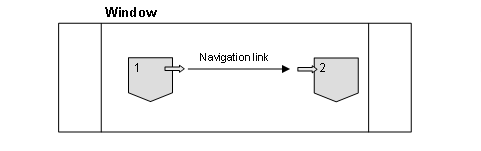
The Web Dynpro window contains the structure of all views to be displayed and is also connected to the Web Dynpro application via an interface view (see also below).
Advanced Functions of Web Dynpro Windows
Window Controller and Window Plugs
Each Web Dynpro window contains a controller with context, methods, outbound plugs, and inbound plugs. You can use the plugs to set up cross-component navigation.
In a simple
application, the starting point of a navigation is the start view. It is
created at design time. This is done in the Window Editor using the context
menu of the window tree. In a more complex application, the event handler
method of the used inbound plug can be used to dynamically decide which view
is to be displayed first. For more information, refer to the section on Window Plugs
in the architecture
manual.
Interface View
An interface view with an identical name
is automatically created for each window. It defines the cross-component
interface of the window. Inbound plugs and outbound plugs of a window are
copied to the corresponding interface view when the interface flag is set.
Event handlers are implemented in the window itself. Plugs of an interface
view can be used for cross-component navigation, inbound plugs of an interface
view can be used for the connection to the Web Dynpro
application.