 Layout

Layout
The layout for the page
basket.htm, which you set using the tab page Layout, looks like this:|
<%@ page language="abap" %> <%@ include file="head.htm" %> <h3>Shopping Basket</h3> <% IF application->m_basket IS INITIAL.%> <p> You have no items in your shopping basket. <% ELSE.%> <form action=" <%= runtime->page_url %>"><table> <tr> <td> <b>Title</b> </td> <% data: line_item type bsbasket, item_detail type bsbookdata, count type i. loop at application->m_basket into line_item. add 1 to count. read table bookcat_tab with key cata_id = line_item-catid into item_detail. %> <tr> <td> <input type=hidden value="<%= line_item-catid %>"> <%= item_detail-title %> </td> <td> <%= item_detail-our_price %> <%= item_detail-book_curr %> </td> <td> <input type="text" value="<%= line_item-qty %>"> </td> <td> <input type="checkbox" value="X" > </td> </tr> <% endloop. %> <tr> <td align="right"><b>Total Price</b></td> <td> <%=totalamount%> <%= item_detail-book_curr %> </td><td><input type=submit name="onInputProcessing(update)" value="Update Basket Contents"> </td> <td><input type=submit </tr> </table> </form> <% ENDIF.%> </body> </html> |
The above code accesses the structure
application->m_basket, which represents the shopping basket. m_basket is the only attribute of the Application Class CL_BSP_TUTORIAL.If the structure is empty, the system outputs the line
You have no items in your shopping basket.If the shopping basket contains orders, the system returns to the page containing the code above. When this happens, the system runs the event handlers OnRequest and OnInitialization before it executes the layout (this process is described in detail in the reference documentation in the section
Event Handlers). The event handler OnInitialization calculates the total price of the items in the shopping basket.Then, the entries in the shopping basket structure are read line by line into the variable
line_item type bsbasket. Detailed data for the items is then read from the internal table bookcat_tab, and is output in the form of a HTML table by means of the variable item_detail type bsbookdata.A modifiable HTML input field
<input type="text" size="4" name="basket_input[<%= count %>].qty" value="<%= line_item-qty %>"> exists for every item in the shopping basket. This field contains the total number of items ordered so far. (count is a counter with the value n for the nth item in the shopping basket.)Also, every item has a checkbox which can be used to delete the item from the shopping basket:
<input type="checkbox" name="basket_input[<%= count %>].del" value="X" >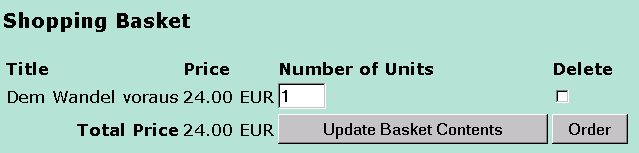
There are two buttons on the page, Update Basket and Order Basket.
Once you can finished with the layout, you can move on to the
Page Attributes and the Event Handlers.