 Assessing
Use
IN SAP IS-U, assessing refers to the automatic handling of meter overflows due to over-estimated previous meter readings.
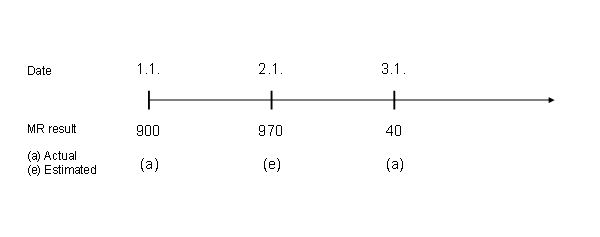
These assessing cases do not deal with actual meter overflows but with over-estimated previous meter readings. When an assessing case arises, a result is released during meter reading entry that triggers workflow template ISU_ASSESS1. This workflow reverses the billing and reestimates the meter reading based on the actual meter reading results.The typical assessing case is illustrated below:
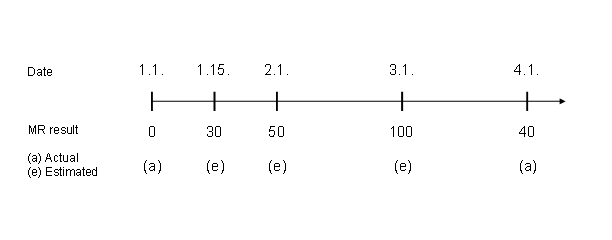
The system determines a meter overflow as the (estimated) meter reading result from 3.1. is higher that the (actual) meter reading result from 4.1.
Since the meter reading result from 3.1. is an estimation, and the last actual result from 1.1. is lower than the current actual result, this is an assessing case.
This means that the system cancels all estimated previous meter reading results that are higher than the current actual result, and reestimates them based on the current actual meter reading result.
In the above example, the system cancels the meter readings from 2.1. and 3.1. and reestimates them based on the actual meter reading result from 4.1.
Integration
Up to SAP IS-U 4.63, assessing can only be used for billing-relevant meter reading reasons. As of SAP IS-U 4.64, assessing can also be used for control meter reading.To do this, you must set the Ass. Control MR indicator ( Assessing also for MR reasons not triggered by billing (09,10) ) in Customizing activity Define Technical Control Parameters for Meter Reading Data Processing (table TE410s).
Prerequisites
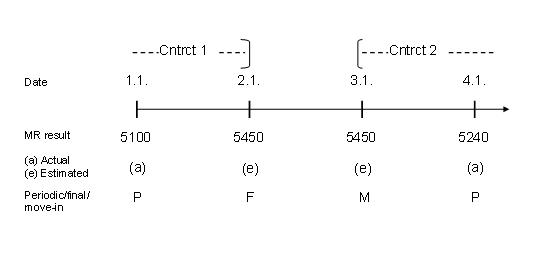
The assessing workfow can only adjust an overflow within a contract. If a change of contract has taken place (due to a move-in/out, for example), the assessing workflow is not triggered and an error message is displayed.

The following example is not an assessing case as a contract changes has taken place due to a move-in/out.
Features
The algorithm for determining an assessing case is as follows:
Determination of consumption V1, which occurs between the last actual meter reading result and the current meter reading result. The meter reading results that lie between are ignored.
Determination of consumption V2, which occurs between the last actual meter reading result and the last estimated meter reading result. The meter reading results that lie between are ignored.
If V2 > V1, an assessing case arises.
The following example is an assessing case:
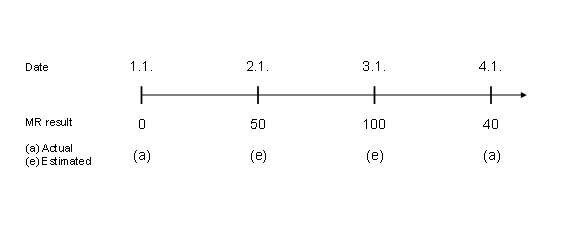
V1 = 40 (0 – 40)
V2 = 100 (0 – 100)
V2 > V1 => Assessing required
Function module ISU_EVENT_ASSESSING checks whether assessing is required. Once the workflow has been triggered, the corresponding billing documents are reversed and the relevant meter reading results are reestimated in function module ISU_ACTION_ASSESSING.

You can use enhancement EDMASSES to implement customer-specific checks for the determination of assessing cases.
Example
Example 1 - Assessing: Estimated MR Result Lead to Overflow
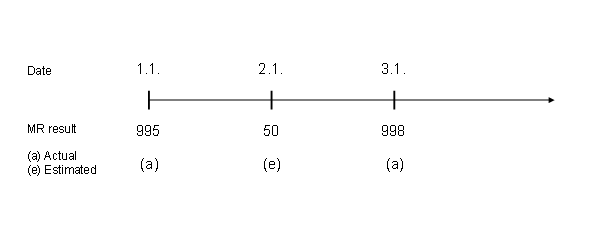
V2 (55) > V1 (3)
=> Assessing required
The meter reading from 3.1. is higher than that from 2.1.(no overflow), however, the estimated meter reading result from 2.1. was over-estimated and resulted in a meter overflow.
Example 2 – No Assessing

V2 (100) < V1 (9990)
=> No assessing required
A reestimation would result in an overflow (high consumption).
Example 3 – No Assessing: Actual Meter Overflow (3-figure meter)
V2 (70) < V1 (140)
=> No assessing required