 IDoc Interfaces for Data Transfer to Accounting
FI/CO Interface in the SAP R/3 System
The FI/CO interface (RWIN) is the central interface for transferring postings from other application components in the SAP R/3 System to Accounting. The FI/CO interface controls updates of actual data in Accounting and carries out checks from the Accounting standpoint.
Actual data relevant to Accounting from other SAP R/3 application components is first transferred to the FI/CO interface. The FI/CO interface then sends the data to the appropriate Accounting application component (such as Asset Management, Financial Accounting, Cost Center Accounting, Profit Center Accounting, Profitability Analysis, and so on).
 Example
Billing data from the Sales and Distribution (SD) application component is transferred to the FI/CO interface. The interface then creates the relevant Accounting documents (CO document, FI document, and so on).
IDoc Interfaces to Other SAP R/3 Systems
If you use distributed systems (Application Link Enabling = ALE), the FI/CO interface takes all actual data relevant to Accounting from other SAP R/3 Systems, but not data from the Accounting application components of the other SAP R/3 Systems.
Example
Billing data from the Sales and Distribution (SD) application component in another SAP R/3 System is transferred to the FI/CO interface.
IDoc Interfaces to External Systems
The FI/CO interface uses an intermediate document (IDoc) interface, which supports transfers of data based on business transactions from external systems to the Accounting application component in the SAP R/3 System.
The IDoc interface for the FI/CO interface can transfer data from the following business transactions:
Goods movement
Billing
Invoice receipt
Billing data can update to the Profitability Analysis (CO-PA) application component.
The IDoc interface fulfills the Open Application Group (OAG) communication structure for the following Business Object Documents (BODs):
Post Journal (goods movement)
Communication between logistics and accounting systems
Load Receivable (billing)
Import of a billing document from an external system. Along with billing information, the IDoc includes segments with characteristics and value fields for Profitability Analysis.
Load Payable (invoice receipt)
Transfer of an invoice receipt from an external system or transfer of an invoice receipt to an external system
Confirm BOD
Confirmation of the successful processing of a received Business Object Document or sending of error messages
The IDocs for the business transactions can be provided with data via the BODs.
The data, once prepared for the FI/CO interface, generally results in general ledger (G/L) postings and postings in the subsidiary ledgers for customers and vendors in the Financial Accounting (FI) application component. The integration of the SAP R/3 System ensures that other Accounting components have access to this data.
The IDoc serves as the source document for all other documents created in the SAP R/3 System. The connection between the IDoc and the follow-on documents is the document number in the external system or in the other, distributed, SAP R/3 System. You can also display the IDoc from the line item display.
Transferring Data to the FI/CO Interface
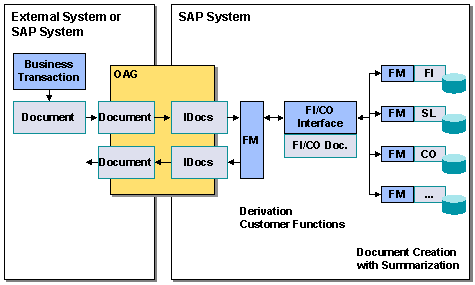
The following graphic illustrates the data transfer procedure to the FI/CO interface in the SAP R/3 System.
 ( )
( )
Outbound System
The outbound system (either an external system or another SAP R/3 System) writes documents on the basis of business transactions made. The data is transferred to the IDoc interface of the outbound system, whereupon the outbound IDoc moves to the BOD structure.
Inbound System
The inbound system (an SAP R/3 System) also possesses an IDoc interface. Inbound IDocs are provided with data via the BODs.
The following table shows the IDocs and message types that exist in the SAP R/3 System.
Business Transaction |
IDoc |
Message type |
Goods movement |
ACPJOU01 |
ACPJMM |
Billing |
ACLREC01 |
ACLREC |
Invoice receipt |
ACLPAY01 |
ACLPAY |
The individual business transactions have the following check modules, which verify the corresponding coding block. These check modules belong to function group ACC3.
Business Transaction |
Check module |
Goods movement |
ACC_CODINGBLOCK_CHECK_PJMM |
Billing |
ACC_CODINGBLOCK_CHECK_LREC |
Invoice receipt |
ACC_CODINGBLOCK_CHECK_LPAY |
An IDoc contains the mandatory and optional fields for the BODs along with SAP-specific fields, which are all optional fields. If, during data transfer via the IDoc interface, only mandatory fields are filled, the SAP R/3 System functions cannot be used to their maximum capacity.
The data is transferred to one of the following function modules (FM) according to the business transaction:
IDOC_INPUT_ACPJOU (goods movement)
IDOC_INPUT_ACLREC (billing)
IDOC_INPUT_ACLPAY (invoice receipt)
The function modules prepare the data for the FI/CO interface and create the appropriate FI/CO document. When preparing the IDocs, the function modules also check whether all mandatory fields are filled and convert ISO-normed units of measure, currencies, and currency units, as well as other fields, into SAP standard fields.
The FI/CO interface function modules include customer functions for modifying a line before it is included in the FI/CO document (for example, to insert additional data).
If no errors occur when the function modules process the data, it is transferred to the FI/CO interface for further processing.
Errors during data processing in the function module result in status messages documented by the IDocs and their inclusion in an error log. The outbound system can be informed of error messages or the successful processing of the IDoc via a response IDoc ( confirm ). The response IDoc is transferred via the IDoc interface of the SAP R/3 System to the outbound system and can be converted into a BOD.
The following errors can occur during IDoc processing:
Error during checks of the transferred mandatory fields
Error during the conversion of the unit of measure from the ISO norm to the SAP standard
Error during the conversion of the currency from the ISO norm to the SAP standard
Error during the conversion of other fields to the SAP standard
Error during checks of the FI/CO document by the FI/CO interface
Preconditions and Requirements
Synchronization of the outbound and inbound systems is mandatory; the same account assignment objects must exist in both systems during the data transfer.
In the inbound system, ensure before transferring data that the required account assignment objects exist. During the transfer, the FI/CO interface checks whether the account assignment objects used in the IDoc actually exist.
Limitations in Comparison with an Integrated System
You cannot make real reverse postings, which only use the document number to be reversed. The document number of the document to be reversed can, however, be given to the inbound system as part of a reverse posting. The number updates to the individual SAP R/3 application components together with the document. The document to be reversed is thereby flagged.
IDoc Structure
The structure of the IDocs and their documentation is defined in the SAP R/3 System. To display these, proceed as described in Displaying IDoc Type and Segment Documentation