 Reversing Device Installations
Use
This procedure enables you to cancel device installations
Prerequisites
You have executed a device installation that you want to cancel.
Procedure
Remove the device ( billing-related removal ) from all utility installations for each installation date.
You can find the installation dates under
 Utilities Industry
 Device Management
Device Installation
Installation Structure
Rate Data
Device Management
Device Installation
Installation Structure
Rate Data
 or
Utilities Industry
Device Management
Technology
Device.
or
Utilities Industry
Device Management
Technology
Device.
Terminate any device allocations or relationships you have created.
Reverse the installation.
The device has now been technically removed .
If necessary, perform a stock transfer for the device removed.
To do this, choose
Utilities Industry
Device Management
Technology
Device
Device Transfer via Serial Numbers
or
Device
General Inventory Management
Goods Movement
Transfer Posting
.
Result
The device installation has been fully reversed. The device now has the status Removed again.
Example
Initial Situation
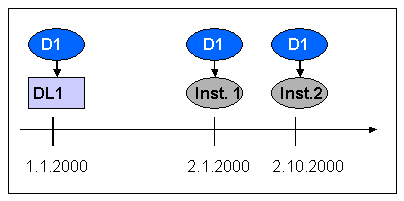
Device D1 is technically installed at device location DL1 on the 01.01.2000.
A billing related device installation of device D1 is performed at installation 1 (Inst.1) on the first of February 2000.
A billing related device installation of the device D1 is performed at installation 2 (Inst.2) on the tenth of February 2000.
 ( )
( )
Reversing Device Installations:
You want to reverse the device installation. Proceed as follows:
Execute a billing-related device removal of device D1 from installation 2 for the tenth of February 2000.
You have now reversed the billing-related installation in installation 2.
Execute a billing-related device removal of device D1 from installation 1 for the first of February 2000.
You have now reversed the billing-related installation in installation 1.
Reverse the installation.
 ( )
( )