Set Up Template Installed Base

Attributes in an installed base can be structured as follows:
A product provides a customer with one or more services for selection. Each service consists of one or more basic service (such as a telephone or Internet connection) and any additional services required (such as call forwarding). Each of these services can now contain attributes. One example of this type of division is as follows:
Set Up Template Installed Base:
· Create attributes
Choose the following in the SAP menu: Master Data ® Products ® Maintain Set Types and Attributes (transaction COMM_ATTRSET). Create all attributes here, which will subsequently be required for the product.
· Create set types
Use the COMM_ATTRSET transaction to create a set type for the basic service, which has the product product type and must contain the SAP_PRIMARY attribute. This attribute is used in a template installed base with several services to define one of these services as the primary service. You must also assign the SAP_BUS_AGREE attribute to the set type.
You also need to add the SAP_ACTIVE attribute to the set types for additional services. This attribute enables the same set types to be used for products that offer the same service but different combinations of additional services. Additional attributes defined by SAP are not displayed in the user interface and are not offered by API modules for processing.
· Create object family
Set types for a service (basic and any additional services) are combined in an object family. Create an object family in transaction COMC_PR_OBJ_FAM. You must then create a category from product category Material within the product base hierarchy. To do this, select Master Data Product Maintain Categories and Hierarchies in the easy access menu. The connection between the object family and the set types is created in the category. To do this, allocate the desired set types, in the corresponding sequence, to the category. You do this at the Set Type tab page. Then select the new object family at the Category tab page.
To ensure that the object family can be used within the template installed base, you must create a corresponding installed base category and assign the object family to it. Choose the following in Customizing for Customer Relationship Management: Master Data ® Installed Base ® Installation Base Category ® Define Installed Base Category and Installation Rules.
When defining the installed base category, you should assign the admissible components 0001 Product, 0004 Text Component and 0030 Individual CRM Object.
You can only use the object family in the installed base category required if you have made the assignment in Customizing. Choose: Customer Relationship Management ® Master Data ® Installed Base ® Individual Objects/Object Family ® Assign Object Families to Installed Base Categories.
Detailed information on object family maintenance is available in the documentation for the following Customizing section: Individual Objects/Object Family, under Customer Relationship Management ® Master Data ® Installed Base.
· Create default installed base
Access transaction IB51 and choose the installed base category for which you have released the object family (standard installed base category IT).
Create an
individual object on the Object tab page. Enter the object family and
an object identification. Choose  Enter. The object appears in the hierarchy display.
Select the object and choose the Component Details button. The system
displays the attributes for the object. Use the primary basic service
attribute to select the primary service if several objects are created. The
system assigns the value X to a single object within the installed base. The
value N must be assigned to other objects in this attribute for technical
reasons.
Enter. The object appears in the hierarchy display.
Select the object and choose the Component Details button. The system
displays the attributes for the object. Use the primary basic service
attribute to select the primary service if several objects are created. The
system assigns the value X to a single object within the installed base. The
value N must be assigned to other objects in this attribute for technical
reasons.
The additional service active attributes are used to activate and deactivate additional services. The following applies to the remaining attributes: The system displays values entered in the template installed base as default values during processing.

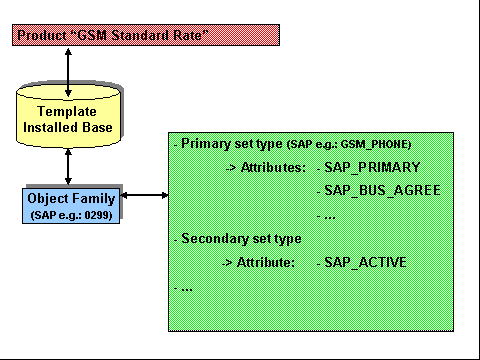
The following diagram explains the connections between individual components. Assign a template installed base, which has individual characteristics during contract creation. You have created the template installed base by specifying a separate template installed base category. Assign the object family required, which in turn contains the set type defined previously and their attributes to this installed base category.
The SAP_PRIMARY and SAP_BUS_AGREE attributes are provided as standard, and must be available in the primary set type. You must also assign the SAP_ACTIVE attribute provided to each additional service.
Standard set types provided by SAP are 0298 and 0299.