 Knowledge Article Management
You can use this business process to create knowledge articles or search for existing knowledge articles. You determine the main data for new knowledge articles, define the authorization scope, and define relationships to master data. You can print or e-mail knowledge articles, and assign them to transaction data as needed.
Process
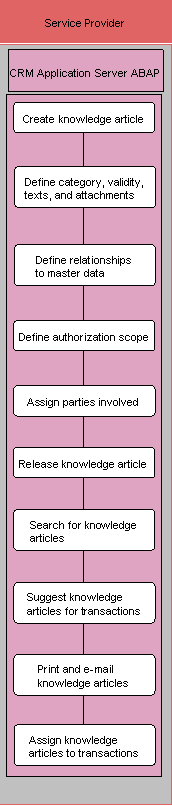
Create knowledge article (SAP CRM)
You can manually create knowledge articles or use a knowledge article template.
Define category, validity, texts, and attachments (SAP CRM)
Define relationships to master data (SAP CRM)
For example, you can assign products, installed bases, business partners, or objects to knowledge articles.
Define authorization scope (SAP CRM)
For example, you can label a knowledge article as public, internal, or confidential.
Assign parties involved (SAP CRM)
When the users are assigned to the knowledge article, the system notifies them by e-mail.
Release knowledge article (SAP CRM)
Note: You can change the status of a knowledge article, for example as Open, In Process, Completed, or Rejected as required.
Search for knowledge articles (SAP CRM)
Suggest knowledge articles for transactions (SAP CRM)
You can assign transactions to knowledge articles using the Related Transactions assignment block. When viewing the transactions, you can have the system search for related knowledge articles by using Find Knowledge Articles or Suggest Knowledge Articles.
Print and e-mail knowledge articles (SAP CRM)
You can create PDF versions of knowledge articles using Smart Forms. You can e-mail knowledge articles from your Interaction Center (IC) cart, or by creating a follow-up e-mail.
Assign knowledge articles to transactions (SAP CRM)
Transactions may include, for example, incidents, problems, cases, or campaigns.