 Description of the Interfaces
Process
The calculation is triggered at header level in quotations. The system then copies the current price version to a new one with the status In Costing. The system assigns a unique ID to the calculation request (SIMULATION_ID). This ID is used as a reference by the calculation tool. The CRM System expects it to be included in the response it receives and it means that a quotation can be calculated several times.
The system then generates an outbound BDoc in the CRM middleware, which is forwarded to the adapter for the calculation tool (CRMXIF_ISU_CALCREQ_SAVE). This adapter can be used to convert data from the internal BDoc structure to the external format for the interface.
The system then transfers this data in the external format to the interface that performs the data transfer to the calculation tool in the asynchronous mode. If outbound processing is successful, the system changes the status of the quotation from To Be Calculated to In Calculation.
Prices can now be determined in the external calculation tool. You can read data from the CRM System at any time subsequently using synchronous interfaces.
An asynchronous interface is available, to which the system transfers the result of the calculation. This inbound interface transfers the data to CRM MW, which updates the quotation. If the system no longer expects to receive any more recent open calculation than that one in the message, it resets the In Calculation status.
The status of the price version is set to active if the calculation has not been cancelled manually and if a more recent price version is not available.
The system displays the result of the calculation in the item details for the quotation application. The agent has the option of checking values from the calculation and activating the price version if necessary.
Alternative Behavior for Strucutred Documents
With structured documents, you can execute calculation separately for different parts of the quotation document. You can trigger calculation either for the entire document, at main item level, or at subitem level. The price versions that are calculated together are given the same SIMULATION_ID.
The lock against changes and status management both occur at item level, not at header level, as is the case with lean documents.
In contrast to lean documents, in structured documents the system only provides a small number of attributes to the relevant items. If the calculation tool requires additional data from SAP CRM, this data is read subsequently using special interfaces.
In the response, the CRM system expects that all items calculated under one SIMULATION_ID are also confirmed together. The only possible exception would be subitems that previously inherited prices from the main item. If one of these items is not included again in the response, the CRM system assumes that the prices for the main item also apply for the subitem.
For structured documents, the price version must be identified by means of the SIMULATION_ID. It is not possible to identify the document using the Price Version field.
Structure
Outbound Message: Calculation Request
Schematic Display of Contents of Outbound Message for Lean Documents
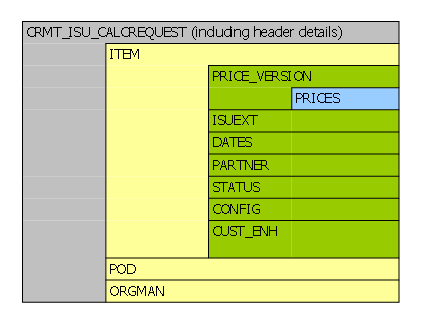
The interface for calculation requests contains data from the quotation header, item data and data for the point of delivery (PoD). A message can contain many items and PoDs.
The system uses the CRM_ISU_CALC_REQUEST RFC module for the outbound message. The name of the data type for the parameter transfer is CRMT_ISU_CALC_REQUEST.
Schematic Display of Contents of Outbound Message for Strucutred Documents

The interface for calculation requests contains the reference to the quotation header of the main document, the simulation ID, and the item data. A message can contain many items.
The system uses the CRM_ISU_CALC_REQUEST_S RFC module for the outbound message. The name of the data type for the parameter transfer is CRMT_ISU_CALC_REQUEST_S.
Inbound Message: Calculation Result
Schematic Display of Content of the Inbound Message
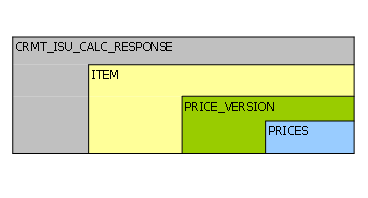
The interface for the calculation result also contains the current price version and associated prices in addition to the references to the quotation header and quotation items.
The system uses the CRMXIF_ISU_CALCRESP_SAVE RFC module for the inbound message. The name of the data type for the parameter transfer is CRMT CRMT_ISU_CALC_RESPONSE.
If the calculation tool proposes or changes the product, fields are available in the CRMT_ISU_CALC_RESP_ITEM structure for the product ID or GUID, which you can use to change the product in the quotation item.
The system can overwrite all existing prices for the price version when the prices are returned. To do so, you must define the value X for the CONTAINS_COMPLETE_VERSION parameter in the PRICE_VERSION segment.
If the system is to retain prices that have already been saved in CRM and are no longer supplied via the interface, do not make an entry for the parameter CONTAINS_COMPLETE_VERSION.
Enhancement Options
The interfaces contain the data that is used by SAP and is relevant for the standard process. The system transfers information, which has been defined in the enhancement technology Lean Configuration, automatically to the interface (segment CUST_ENH).
If you want to use additional customer fields for the quotation process, which are also required for the calculation, you can extend the structure of the interface accordingly. BAdIs are available for mapping and making entries in fields. In Customizing for CRM choose  Industry Solutions
  Utility Industries Transactions Costing General Settings BAdI: Enhance Mapping for Calculation Request Message
  or Utility Industries Transactions Costing General Settings BAdI: Enhance Mapping for Calculation Response Message .