 Repository Manager
The repository manager for DAM makes versions of digital assets managed by the CRM server available to SAP Enterprise Portals Knowledge Management Collaboration (KMC). To activate this functionality, activate the instance of the repository manager for DAM.
Note that the repository manager is available with Digital Asset Management and is not a standard repository manager in KM.
For more information, see SAP Help Portal at  http://help.sap.com
 SAP NetWeaver SAP NetWeaver
7.0 (2004s) SAP NetWeaver Library
SAP NetWeaver by Key Capability Information
Integration by Key Capability Knowledge Management
Administration Guide System
Administration System Configuration
Content Management Configuration Repositories
and Repository Managers
SAP NetWeaver SAP NetWeaver
7.0 (2004s) SAP NetWeaver Library
SAP NetWeaver by Key Capability Information
Integration by Key Capability Knowledge Management
Administration Guide System
Administration System Configuration
Content Management Configuration Repositories
and Repository Managers  .
.
Calculating the Hierarchy Depth
The repository manager for DAM uses a technical, alphabet-based
hierarchy to distribute documents in a virtual tree. This hierarchy is purely
a technical one, and is used to make versions of digital assets available
to the KMC Crawler. It has not been developed for navigation purposes to assist
users find digital assets. The hierarchy is determined by height and depth
parameters. Before activating DAM, calculate both parameter values and enter
them in Customizing at Customer Relationship
Management Marketing Digital
Asset Management Maintain General Settings
in DAM under the RM_HIERARCHY_DEPTH and
RM_HIERARCHY_RANGE parameters.
You can reorganize the technical hierarchy, but this may require some time depending on the number of digital assets contained within it. No more than 100 digital assets should be assigned to a virtual directory.
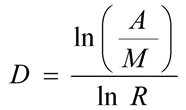
To improve performance, we recommend you use a formula to calculate the depth beforehand. To do this, you need the following input:
Variable |
Description |
Value |
|---|---|---|
M |
Maximum number of digital assets assigned to a virtual folder |
Recommended: 50 |
R |
Hierarchy width, is specified as an interval, for example, 4 is the interval from A to D |
Default: 26 |
A |
Estimated number of digital assets required |
-- |
D |
Hierarchy depth |
Default: 2 |
Formula
Prerequisites
You have been assigned to the SystemAdmin role.
You have modified parameters RM_HIERARCHY_DEPTH and RM_HIERARCHY_RANGE to meet your requirements in Customizing at
Customer
Relationship Management Marketing
Digital Asset Management Maintain
General Settings in DAM .
Activities
Activate a new instance of the DAM Repository Manager with the following settings:
Parameter |
Mandatory |
Description |
|---|---|---|
System Alias |
Yes |
System Alias Default: SAP_CRM |
Service User |
Yes |
Service user for access to the backend. Default: index_service |
Cluster ID |
No |
If you have connected your portal to a CRM system by several server nodes or portal instances, enter a unique ID. If you want to change the ID, delete the ID with report CRM_DAM_REMOVE_RM_INSTANCE. |
The repository definition is in the portal at System Administration Knowledge
Management Content Management.
Example
If you have made the following settings in Customizing, RM_HIERARCHY_DEPTH = 2 and RM_HIERARCHY_RANGE = 4, the structure of your repository in the portal would look like this:
A
A
B
C
D
B
A
B
C
D
C
A
B
C
D
D
A
B
C
D