 Set-Up and Load Guide for Business Agreements and Contract Accounts
Integration
The business agreement in SAP CRM is replaced in SAP ERP by the contract account. The unique ID (GUID) uniquely allocates a business agreement to a contract account and vice versa. A business agreement or contract account cannot be created in the other system using the CRM middleware unless the corresponding sold-to party or contract partner was also created (using the CRM middleware) in the other system beforehand. The business agreement only contains some of the fields from the contract account. However, some of these fields have different formats. Therefore, special mapping tables exist for these fields. When creating a business agreement, the CRM system sends a BDoc containing the relevant data to the SAP ERP system. The corresponding contract account is copied to SAP ERP from a template. The system determines the template contract account by means of the business agreement class selected in the business agreement.

If you create a contract account directly in SAP ERP, the process runs in the opposite order.
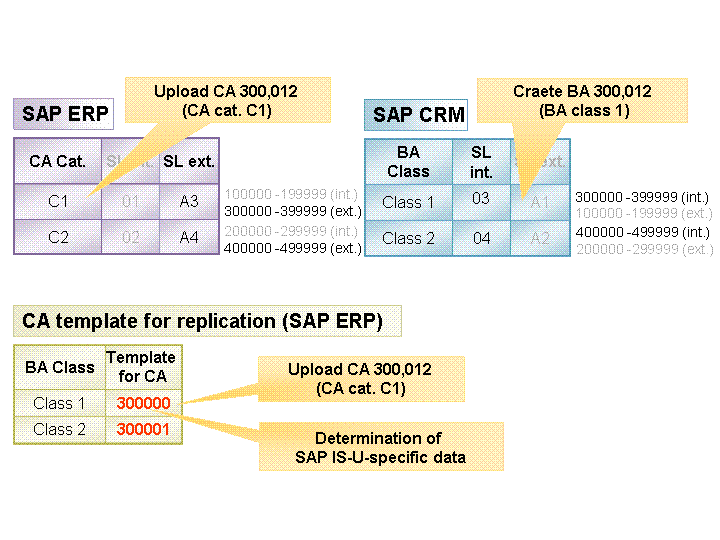
The contract account is created in a specific number range. The same number range is determined in SAP CRM as a result of the synchronized nunmber ranges. This number range automatically defines the business agreement class. A 1:1 relationship between the business agreement class and the contract account category is technically possible, but not necessary.
Activities
In Customizing for Customer Relationship Management under  Master Data
  Business Partner Business Agreement Define Basic Settings
  (table CRMC_BUAG_ACTV) you must confiure FI-CA for active open item accounting.
The template contract accounts, which are dependent on the business agreement class, are defined in SAP ERP in table TFK_BUAG_REF. You can find this table in Customizing for Financial Accounting under Contract Accounts Receivable and Payable Integration Customer Relationship Management Business Agreement Determine Contract for Contract Account for Replication .
If you use SAP Utilities, SAP Telecommunications, or SAP Media , the following tables are also relevant:
In table TFK_MAP_KOFIZ_SD, the tax feature (based on the business partner class) is allocated to the account determination ID. You can find this table in Customizing for Financial Accounting under
Contract Accounts Receivable and Payable Integration Customer Relationship Management Business Agreement Allocate Field Values for CRM Tax Features to Account Determination IDs .
In table TFK_MAP_ZAHLKOND (Customizing for Financial Accounting under
Contract Accounts Receivable and Payable Integration Customer Relationship Management Business Agreement Allocate Field Values for CRM Payment Conditions to Payment Conditions , the payment conditions are allocated to one another.
Determining the Business Agreement Class
When downloading a contract account, the system can use the FI-CA event 1022 (see tables TFKFBM, TFKFBS, and TFKFBC in SAP ERP) to determine the business agreement class. Note that the system can change the business agreement class. This is because the contract account and business agreement class must have an identical number (see the Number Assignment section).
Standard Business Agreement
There is no Standard Contract Account indicator for the contract account in SAP ERP (similar to standard business agreement). Use FI-CA event 1023 to determine whether the relevant business agreement is set as the standard business agreement during download. Here, you can re-read the contract accounts for the business partner and decide whether or not you want to set the indicator.
 Note
Note
The Standard Business Agreement field is not a required entry field. Selecting this field can lead to a loss of performance.
Number Assignment
In some components, such as SAP for Utilities, the business agreement has the same number as the corresponding contact account. The CRM system makes sure this is the case by determining a business agreement class with a suitable external number range. In SAP ERP, the system determines a contract account category, to which a suitable external number range has been allocated.
You must configure the number ranges in such a way that each internal number range has a corresponding external number range in the other system.
During the initial download, you must temporarily switch the number ranges from internal to external and allocate each number range to at least one business agreement class.
Event Modules
Below is a list of the necessary event modules. Most of these should already have been delivered correctly.
In SAP ERP, you have to make the following entries for the Business Agreement object in table COM_BUPA_CALL_FU (set the call indicator):
Event |
Item |
Name of Function Module |
|---|---|---|
Mapping Inbound Processing |
100000 |
COM_BUAG_MWX_MAP_MAIN_CENTRAL |
Mapping Outbound Processing |
100000 |
COM_BUAG_MWX_BPS_FILL_CENTRAL |
In SAP CRM, you have to make the following entries for the Business Agreement object in table CRMC_BUT_CALL_FU (transaction SM30) (set the call indicator):
Event |
Item |
Name of Function Module |
|---|---|---|
CRM Inbound Processing |
50000 |
CRM_BUAG_BDOC_MAP_NUMRANGE |
CRM Inbound Processing |
100000 |
CRM_BUAG_MWX_PROCESS_EXT_STRUC |
CRM Outbound Processing |
100000 |
CRM_BUAG_MWX_FILL_EXT_FROM_MEM |
CRM Outbound Processing |
200000 |
CRM_BUAG_MWX_FILL_EXT_FROM_DB |
Extractor |
100000 |
CRM_BUAG_MAIN_GET_ID_LIST |
In SAP ERP, in the case of the following FI-CA events, you must allocate a function module to each application in table TFKFBS:
Event |
No. |
Standard Module |
|---|---|---|
1020 |
0 |
FKK_EVENT_1020 |
1021 |
0 |
FKK_EVENT_1021 |