 Modeling the Decision Basis
During modeling of a decision basis (DBA modeling), you define the structure of the decision basis data in a DBA model. The entity type is the smallest data unit in a decision basis. If a dependent relationship exists between data in entity types, you can also structure entity types as a hierarchy in an entity types tree. Every superordinate table entry in this type of data structuring has additional referencing entries in lower-level tables. You can reuse entity types for several DBA models. If you are using hierarchically structured entity types, this reuse applies to the entire entity types tree.
Entity types and the data fields that they contain are originally customer table enhancements in the Application Enhancement Tool (AET) in functional terms. The following diagram uses a simple model to illustrate the context in which entity types are directly related to the AET enhancements as the smallest data units in a model. The example model contains the three entity types x,y nd z. Entity types x and y are structured as an entity types tree here. You must define the hierarchical relationship between tables as a deep table in the AET.
To use a DBA model as a decision basis, you must first assign the model to a decision basis type using a DBA item category. Assigning a decision basis type to a benefit program makes the DBA data available for the social service plan processing steps eligibility determination, entitlement determination and entitlement calculation.
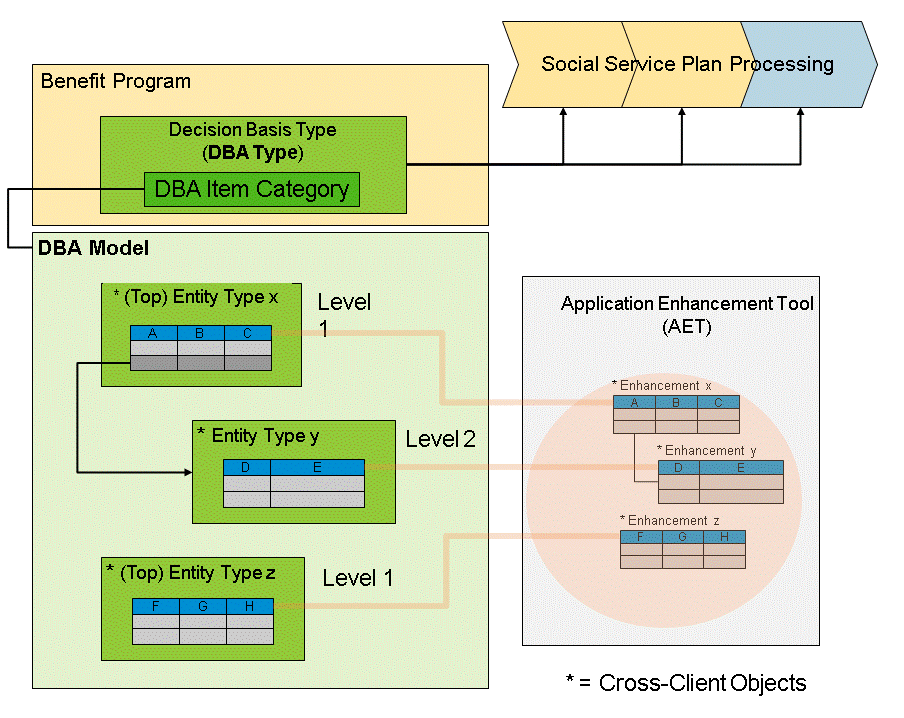
Figure: Modules in DBA Modeling
If you want to use this function, you must activate the CRM business function Social Services, 2013 (CRM_IPS_4S_4
) and the ERP business function Social Services, 2013 (ERP_IPS_4S_4
).
Integration
In DBA modeling, entity types and the data fields they contain are based on enhancements that you define and generate in the Application Enhancement Tool (AET).
 Note
Note
Customer enhancements are created with a sequential enhancement ID by the AET. To ensure that you can make a unique distinction between DBA enhancements and additional AET enhancements, we recommend reserving a separate name space for the DBA object enhancement IDs (see SAP note 84282 ).
).
Features
Cross-Client Entity Types
To define a decision basis, define the DBA data required for each model in a sequence of entity types. Each entity type contains the selection and characteristics of specific data fields as the smallest reusable data unit in the decision basis. You must first define these data fields as customer tables in the Application Enhancement Tool (AET). You can also use the AET to generate the ABAP dictionary objects required. The AET combines all of the data fields generated for an entity type under a single enhancement ID.
You define entity types in Customizing for Social Services and assign the respective AET enhancement to them. You can use both the entity types and the enhancements generated in the AET in all system clients.
Structuring Entity Types
You can structure the reference of entity types to one another hierarchically as an entity types tree. You can use this type of structuring to distribute dependent data between several tables according to logical criteria.
You define the structural assignment of entity types to one another in the AET by defining deep tables. In Customizing for Social Services, you must ensure that the hierarchical reference between entity types matches the settings made in the AET.
NoteYou can extend the structuring of your customer data as a deep table to any number of hierarchy levels. However, when modeling your decision basis, you should consider its subsequent usability in the Web Client UI and any potential impact on system performance.
End of the note.Client-Dependent DBA Model
Whilst you create both AET enhancements and entity types in the system as cross-client objects, you define DBA models in the Social Services Customizing settings for a specific client.
You can reuse entity types several times for various DBA models. However, you must reuse entity types that are combined as deep tables completely as an entity types tree. As shown in the example entity types tree in the diagram above, you also assign the assigned entity type y to the respective DBA model with the top entity type x.
Display and Navigation in the CRM WebClient UI
Entities in an entity type are displayed as an assignment block in the WebClient UI. The name of the generated associated AET enhancement is used as the title of an assignment block. Entities are displayed in the WebClient UI as a list or as detailed data. You control this selection using the assignment block
Decision Basis Explorer
by selecting the respective entity. The Decision Basis Explorer provides a structured view of and navigation options for all existing entities. If you have not selected an entity in the Explorer, the system displays the entries for all top entity types as a list. By selecting an entity, you restrict the selection to this entity (as detailed data) and the lower-level entities (as a list).DBA Model Replication in SAP ERP
To use the decision basis, you must ensure that the DBA modeling data defined in SAP CRM is also available in an identical format in SAP ERP. To do so, in the Social Services ERP Customizing settings, use the activity
Replicate Decision Basis Modeling
to perform an identical replication of the DBA modeling data. NoteIn the Social Services CRM Customizing settings, you can use the activity
Check Decision Basis Customizing Consistency
to check the Customizing settings in SAP CRM and SAP ERP.End of the note.