 Entitlement Adjustment
When you create a follow-up social service plan (SSP), you can use this function to determine existing entitlement items created in previous benefit decisions that are relevant to the new SSP. Entitlement adjustment is an automatic process that is triggered when the decision assessment is executed. The resulting entitlement items are displayed in the Entitlement Items
assignment block when the assessment status of the plan is set to Decision Assessed
.
If previous SSP versions exist for the current SSP, entitlement items that were manually created or updated in the previous versions are taken into account. Since only items that are affected by the new decision are copied to the new SSP version, all items created from previous versions have the status Not Entitled
. If you want not entitled items to be entitled, you must create a new item manually with the status Entitled
.
If you want to use this function, you must activate the business function Social Services - Benefit Calculation (CRM_IPS_4S_1
) and the business function Social Services - Benefit Calculation and Payment (ERP_IPS_4S_1
).
Features
Entitlement adjustment processes items from previous SSPs according to the following criteria:
Depending on how many previous benefit decisions exist for the current SSP, time slices of decision periods from several previous SSPs may need to be evaluated during entitlement adjustment for the current SSP.
 Example
Two previous SSPs exist for a new SSP version that was created as a follow-up social service plan. The first earlier social service plan has a decision period from January 1, 2009 through August 1, 2009. The second earlier social service plan (that is created as follow-up SSP to the first SSP) has a decision period from March 1, 2009 through August 1, 2009. In this situation, the second earlier social service plan only partially replaces the first social service plan meaning that the first version is still valid from January 1 through February 28th. A third follow-up SSP, (current plan), is then created for a decision period from February 1, 2009 to August 1, 2009. Since the third social service plan only partially replaces the third, the entitlement correction for the period from February 1 through February 28th evaluates the first social service plan. The entitlement correction evaluates the second social service plan for the period from March 1 through August 1 to cover the entire period from February 1 through August 1. In general, the first SSP version is still active for the period from January 1 to February 28.
End of the example.If several previous SSPs exist with different decision periods to the most recent SSP, it may be necessary to evaluate other entitlement items in addition to the ones in the SSP from which the follow-up SSP was created.
ExampleThe social service plans with the corresponding decision periods in the example above contain two entitlement items in the first social service plan: The first one starts on January 1 and is valid through August 1, and the second starts on April 1 and is also valid through August 1. If you create the second SSP with a decision period starting on March 1, the entitlement period of the first entitlement item now also starts on March 1. The entitlement period of the second item remains unchanged. If a third follow-up SSP is created that starts on February 1, the entitlement periods of the two entitlement items can remain unchanged. However, to cover the period from February 1 to February 28, the first entitlement item from the first SSP version is evaluated in the latest SSP version, since the first SSP version remains active for the part of the decision period that is not replaced by a new version. This process is shown in the following figure:
End of the example.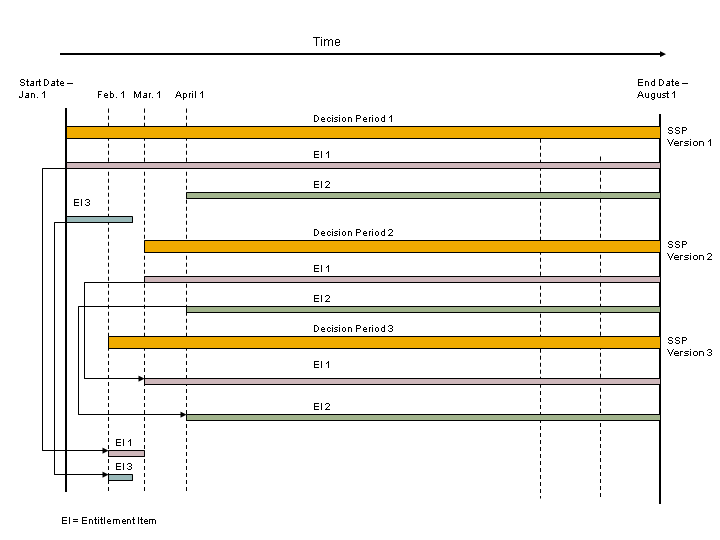
Figure 1: Items Evaluated During Entitlement Adjustment
If the first SSP version contains an entitlement item (EI 3), which is not evaluated in the second SSP version (as shown in the diagram), since it ends before the second decision period starts, it can be evaluated by any subsequent versions if it falls within that new decision period.
If entitlement items from previous SSPs are still valid in the new version, the system generates these as items with the status
Entitled
and they appear in theEntitlement Items
assignment block after entitlement determination. This is also the case for any items that were not entitled in the previous version, but are now entitled in the new version.