Segmentation Based on Objects: Examples
Intersecting Segments or Target Groups with Assigned Objects
The segments A and B contain the following business partners:
Segment A
Business Partner |
Partner Function |
Object |
|---|---|---|
BP1 |
Is owner of |
Model A |
BP2 |
Is owner of |
Model A |
BP3 |
Is buyer of |
Model A |
Segment B
Business Partner |
Partner Function |
Object |
|---|---|---|
BP1 |
Is owner of |
Model A |
BP2 |
Is buyer of |
Model A |
BP3 |
Is buyer of |
Model B |
If you intersect both segments with variant (1) Intersect Partners, Then Merge Objects and Partner Functions
, you have the following result:
Business Partner |
Partner Function |
Object |
|---|---|---|
BP1 |
Is owner of |
Model A |
BP2 |
Is buyer of Is owner of |
Model A Model A |
BP3 |
Is buyer of Is buyer of |
Model A Model B |
When counting, the system only considers the number of different business partners, in this case 3, even though the number of different combinations of business partner-partner function-object is 5 in total.
If you intersect both segments with variant (2) Intersect Partner, Object, and Partner Function
, you have the following result:
Business Partner |
Partner Function |
Object |
|---|---|---|
BP1 |
Is owner of |
Model A |
Splitting and Counting Function for Segments or Generated Target Groups with Assigned Objects
The overall number of business partners (BP) with specific cars is divided up as follows:
Business Partner |
Cars |
Manufacturer |
Model |
|---|---|---|---|
BP 1 |
Car 1 |
Manufacturer 1 |
H1M1 |
Car 2 |
Manufacturer 2 |
H2M1 |
|
BP 2 |
Car 3 |
Manufacturer 1 |
H1M1 |
BP 3 |
Car 4 |
Manufacturer 2 |
H2M1 |
BP 4 |
Car 5 |
Manufacturer 3 |
H3M1 |
Example 1
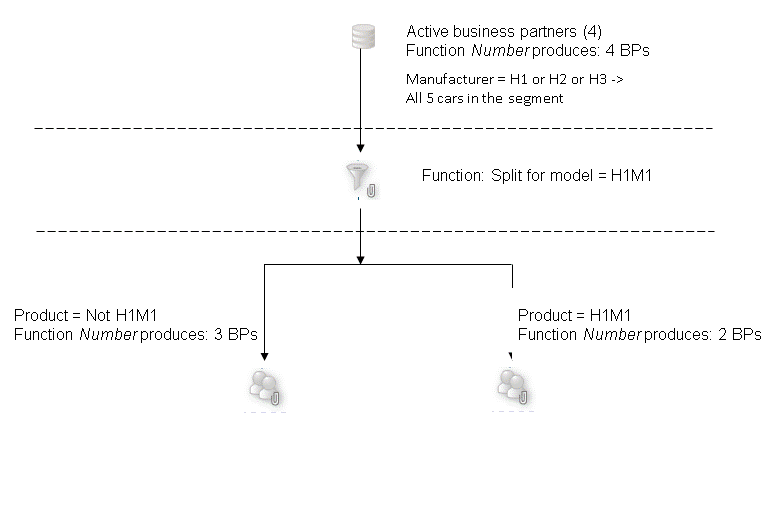
If you use the Split
function for model = H1M1 for a segment that only contains business partners with cars from manufacturers 1,2 and 3, you receive the following two segments:
Segment with cars that are not of model H1M1 with the associated business partners: BP1 with car 2 , BP3 with car 4, BP4 with car 5.
Segment with cars of model H1M1 with the associated business partners: BP 1 with car 1 and BP 2 with car 3.
 Note
Note
The total of the two segments produces 5 business partners and not 4 because the system only counts BPs and BP1 exists in both segments.
Example 2
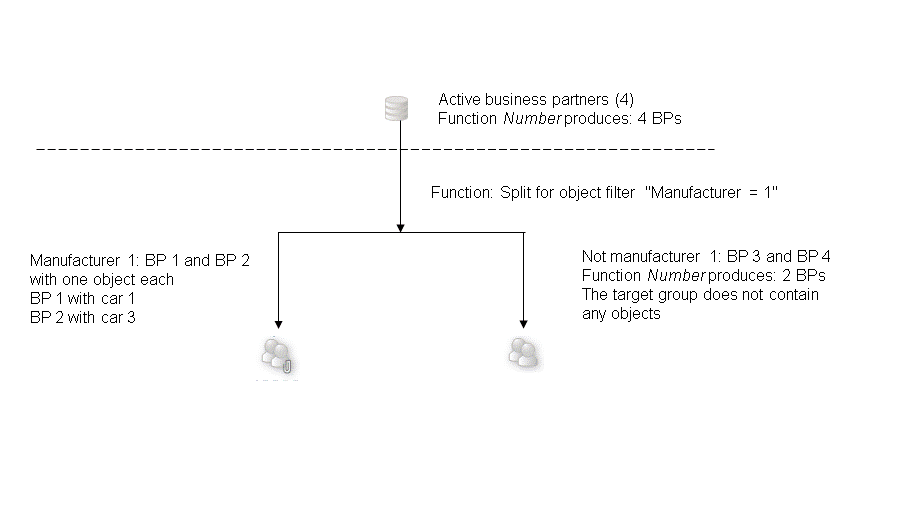
If you use the function Split
, for example for the object filter = "Manufacturer = H1” for the initial segment with business partners, you receive the following two segments:
Segment that contains two business partners without cars with the description
NOT Manufacturer 1
: BP 3 and BP 4.Segment with two business partners who drive cars from manufacturer 1: BP 1 with car 1 and BP 2 with car 3.
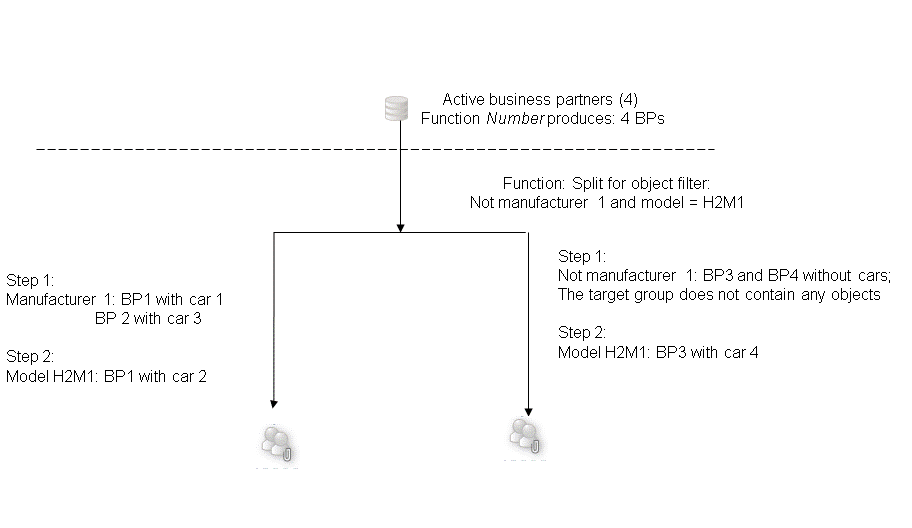
Example 3
If you use the function Split
, for example for "Manufacturer is H1” followed by the step "Model is H2M1" for the segmentation basis, you receive the following two segments:
Segment with the following two steps: Step 1: Manufacturer = H1, Step 2: Model = H2M1. This produces the following business partners:
Business partners with cars from manufacturer H1 (BP1 with car 1 and BP2 with car 3)
Business partners with cars of model H2M1 (BP1 with car 2)
Segment with the following two steps: Step 1: "NOT Manufacturer 1", Step 2: Model = H2M1. This produces the following business partners:
Business partners who do not have a car from manufacturer H1; this step does not produce any objects, but does return BP 3 and BP 4.
Business partners with cars of model H2M1 (BP3 with car 4)
 Caution
Business partner BP1 with car 2 is provided additionally for segmentation with large data volumes (TREX) and with SAP HANA. This business partner drives a car from manufacturer 1, and also a car of model H2M1.
This distinction is only available if you start with a "non" filter for the segmentation basis. This is because all steps are summarized in a single query for TREX and SAP HANA.