
 Conditions for Releasing Data Elements for
Drag&Relate
Conditions for Releasing Data Elements for
Drag&Relate

An important condition is that only output screen fields are drag-enabled.
An instance of a business object is uniquely assigned to each drag-enabled output screen field. This is achieved by assigning the data element underlying the output screen field to a key field (the screen-relevant key field) of the business object type. If a business object type has more than one key field, the other keys are supplied with parameter IDs from the transactions.
In a number of cases, fields in different transactions may have different data elements but be used in the same way semantically, in which case they can also be used to identify the business object type. They can be assigned additionally.
The assignments, or context information, are created as key types. Each key type contains a complete record with the key fields of the business object and the link information for the data elements and parameter IDs used in the transactions. A field of the key must also be marked as identifying in the key type to indicate that there is a relationship between the business object and the data element. This means that all the transactions with screen fields that use this data element, and that correspond to the other key type elements, are uniquely assigned to this business object type.
Parameter IDs are optional for key type entries marked as having an identifying role. (The key value is accessed using the screen field itself.) However, they are obligatory for all other key entries so that they can work with SET/GET functions.

Links cannot be generated if the set/get parameters are not set correctly by the transaction.
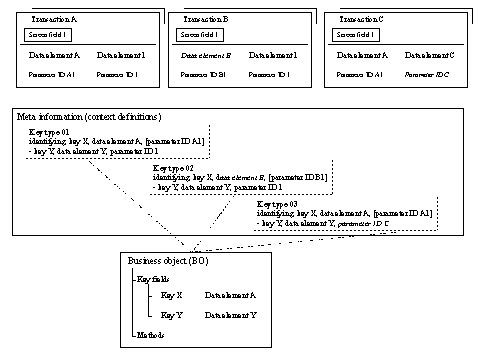
The above graphic shows the connection between the screen field of the source transaction and the business object using key types.
In sample transaction A, key X (with data element A) was marked as identifying in key type 01, since data element A is used by screen field 1 of transaction A. Screen field 1 thus represents the business object and is drag-enabled. The key values are supplied by the screen field and the parameter ID 1. All transactions that support the same key type also become drag-enabled.
It is necessary to specify additional key types if other screen fields that do not support the existing key types need to be drag-enabled. This is the case if data elements or parameter IDs have different names but are used in the same way semantically, as shown in transactions B and C in the diagram.