 Creating an Order for Configurable Materials with EDI


Creating an Order for Configurable Materials with EDI
The following example shows the IDoc structure for a PC. In the configuration profile, the BOM explosion result is defined as Sales order, so the items that are relevant to sales can be configured individually and appear in the sales order as sub-items of the main item. The PC consists of other configurable materials: one or two diskette drives, and two packages with country-specific documentation.
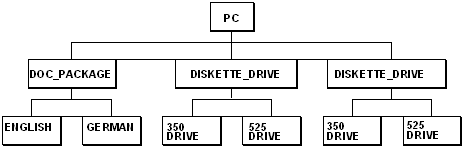
The example uses a sales order with 2 items, which are configured differently.
Item |
Matl # |
Qty |
10 |
PC |
7 |
20 |
PC |
11 |
The items are configured as follows:
Item |
Instance |
Values |
||
10 |
PC |
DISKETTE_DRIVE_NUMBER |
= |
2 |
|
DISKETTE_DRIVE |
DISKETTE_DRIVE_TYPE |
= |
3,5 | |
|
DISKETTE_DRIVE |
DISKETTE_DRIVE_TYPE |
= |
5,25 | |
|
DOC_PACKAGE |
Language |
= |
English | |
20 |
PC |
DISKETTE_DRIVE_NUMBER |
= |
1 |
|
DISKETTE_DRIVE |
DISKETTE_DRIVE_TYPE |
= |
5,25 | |
|
DOC_PACKAGE |
Language |
= |
German |
The following components are copied to the sales order as items, according to the configuration:
Item |
Main item |
Material |
Qty |
10 |
- |
PC |
7 |
20 |
10 |
Diskette_drive |
7 |
30 |
10 |
Diskette_drive |
7 |
40 |
10 |
DOC_PACKAGE |
14 |
50 |
- |
PC |
11 |
60 |
50 |
Diskette_drive |
11 |
70 |
50 |
DOC_PACKAGE |
22 |
The IDoc for this sales order has the following structure:
The connection between sales order item and configuration data is defined in segment E1CUREF.
The general configuration data of the sales order item is described in segment E1CUCFG:
The individual instances in the configuration are described in segment E1CUINS:
The relationships between the individual instances are defined in segment E1CUPRT:
The values assigned to the individual instances are entered in segment E1CUVAL: