
 Variant Functions

Use
You can use these functions to check and derive values. For example, you can use variant functions for:
· Complex calculations based on the characteristic values of the configuration
· Complex validity checks for allowed characteristic values
Variant functions must be defined by the user.
Integration
A variant function is created as customer-specific coding, which is called up from the dependency by the keywords FUNCTION and PFUNCTION. The characteristics and characteristic values are then transferred in a list containing pairs of parameter names and associated parameter values. Variant functions are part of the knowledge base.
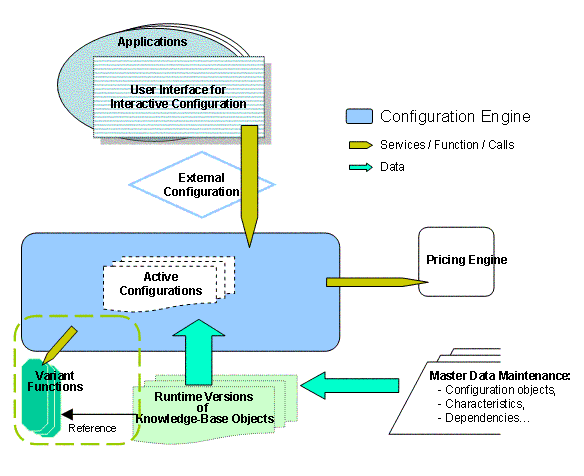
To use variant functions in mySAP ERP Variant Configuration, you have to program them in ABAP. To use variant functions to configure products with the Configuration Engine, however, you have to implement them in Java.
Variant functions must always be created as an ABAP module that covers at least the interface requirements, since you can only set the status of a variant function to Released if the function can be executed.
There is no automatic translation from ABAP to Java.

Product configuration with the Configuration Engine is based on runtime versions of knowledge-base objects. This means that there are certain restrictions with regard to the availability of master data (see ERP Master Data and Configuration Engine). Check whether each variant function works correctly with the available data.
Variant Functions in mySAP ERP
In ERP, you use transactions cu65, cu66, and cu67 to define the parameters for importing and exporting variant functions. You implement variant functions as ABAP functions (see User-Defined Functions).
Variant Functions and the Configuration Engine
Since the Configuration Engine cannot use ABAP functions, you have to recreate the variant functions defined in ERP in Java.
At the start of the configuration process, the Configuration Engine automatically searches the knowledge base for Java classes of variant functions that have the same name as the variant functions created in ERP. If no variant function is found, the Configuration Engine executes the function sce_noop_fn instead, with the output true.
Prerequisites
To implement variant functions, you must have:
· A basic understanding of product configuration
· A basic understanding of variant functions in ABAP
· Knowledge of Java programming
· A Java-integrated development environment (IDE) – optional
Features
There are two types of variant functions that have the same definition and form. However, they address different objects and therefore provide different options:
Properties |
FUNCTION |
PFUNCTION |
Function |
Reads the
knowledge base to derive export parameters. Reads information about the model from the knowledge base. |
Provides read and write access to the configuration and dynamic database (DDBM) |
Use in Dependencies |
Can be used in procedures, constraints, preconditions, and selection criteria. |
Can be used in procedures only |
Addressing |
Import parameters, export parameters, and knowledge base |
All configuration objects |
Risks |
None |
Statuses can be inconsistent if changes to the configuration occur that pass the interface |
Creating Variant Functions
When you create variant functions for models to configure products with the Configuration Engine, remember that the Configuration Engine is based on the Java Transaction Server and uses its infrastructure. For more information and on the steps described below, see SAP Note 870201.
System Environment
To create a variant function, proceed as follows:
1. Load the Java classes required for the Configuration Engine from your system environment (for example, ERP) to your development environment. A report is available for this purpose.
2. Implement your variant functions, taking into account certain restrictions regarding serialization requirements. Compile the variant functions using the Configuration Engine Java classes and prepare the functions for loading into the system.
3. Load the variant functions in the system using a report.
If you want to check the variant functions you loaded into the system (and generally to test your model), you need an up-to-date runtime version of the knowledge base.
Implementation
Create variant functions in the form of Java classes; use the following format to name these Java classes: com.sap.sce.user.<name>
All user-defined functions must use the sce_user_fn interface (see API documentation). This interface knows one method only: boolean execute(fn_args args, Object obj). An example of how to use the interface with a Java class is provided below:
The formal structure of a Java class is independent of the type of variant function and must contain the following core:
package com.sap.sce.user;
public class ZZ_FUNCTION implements sce_user_fn {
public boolean execute(fn_args args, Object obj) {
return true;
}
}
Output Parameter
The output parameter of type BOOLEAN is particularly important for variant functions that check complex conditions, for example, in a constraint or as a selection criterion.
The parameter false corresponds to the exception FAIL in ABAP. The output parameter can also be used to display errors. However, the output parameter should generally be set to true, since only then are the export parameters for the variant function actually set.
Argument
The argument (args from class fn_args) contains a range of variant function parameters, such as the characteristics used to import or export the function.
Import parameters must always contain a value (≠ 0).
Methods
In ABAP, the QUERY structure is used for importing and the MATCH structure for exporting. The following methods can be used in most applications:
· get_value: reads the value of the import parameter arg.

String outputs are suitable for alphanumeric characteristics.
The method get_internal_value is suitable for numeric characteristics. To convert the internal output format to numeric values, use the auxiliary methods (see auxiliary methods).
· get_instance: references $self instance (only relevant for PFUNCTION).
This method is generally used to access the DDB.
You can use auxiliary methods to access other configuration instances, (see auxiliary methods).
· set_value: sets the values of an export parameter.
If a value cannot be set for an export parameter, a runtime error is displayed.
Auxiliary Methods
A collection of useful methods and functions is provided in the SCELIB in the Java class package com.sap.sce.user. You can use these auxiliary methods for:
· Complex operations with just one method call
· String comparisons and character conversions
Most of these methods are suitable for the PFUNCTION since they access the DDB (as all methods do that reference instances, for example).
These auxiliary methods also include methods that correspond to the ABAP function modules of the group CUPR.
For more information about auxiliary methods, see the API documentation.
Compiling Variant Functions
Compile source data using your IDE or the relevant Javac command.
Example
package com.sap.sce.user;
import com.sap.sce.engine.*;
/*
* Java Class for variant function Z_CABIN_LABEL.
*
* This variant function (PFUNCTION) does the following:
* 1) Read the values of three characteristics:
* - ELEVATOR_TYPE (mandatory, using
the standard characteristic
*
interface)
* - MAX_LOAD (mandatory, using the standard characteristic interface)
* - ELEVATOR_OPTIONS (optional,
multi-valued, using a method of SCELIB
* (similar to function
group CUPR)
* 2) Generate a string from the values in 1) and set it as value
* for characteristic CABIN_LABEL.
*
* Motivation:
* 1) Since MAX_LOAD is numeric the string label cannot be generated
* using classical dependencies.
* 2) Since ELEVATOR_OPTIONS is multi-valued, its values cannot be passed
* via the variant function interface and must be read directly from the
* configuration using a read access method (SCELIB).
*
* The variant function is activated as follows:
* 1) Create an
equally named variant function in ERP with input
* characteristics "ELEVATOR_TYPE"
and "MAX_LOAD" and output parameter
.*
"CABIN_LABEL".
* 2) Create a
procedure with the following code and link it to the
*
config.profile:
* pfunction Z_CABIN_LABEL (ELEVATOR_TYPE = $self.ELEVATOR_TYPE,
* MAX_LOAD = $self.MAX_LOAD,
* CABIN_LABEL = $self.CABIN_LABEL)
*/
public class Z_CABIN_LABEL implements sce_user_fn
{
public boolean execute(fn_args args, Object obj)
{
// get the target instance of the PFUNCTION
ddb_inst inst = args.get_instance();
// get elevator type from characteristic interface (Input):
String elevatorType = args.get_value("ELEVATOR_TYPE");
// get capacity from characteristic interface (Input):
int capacity = Integer.parseInt(args.get_value("MAX_LOAD"));
// get elevator options with read method
(scelib) from
//
configuration:
String[] elevatorOptions =
scelib.get_values(
inst,
"ELEVATOR_OPTIONS");
// calculate the cabin label
StringBuffer cabinLabel = new StringBuffer();
cabinLabel.append(elevatorType);
if(elevatorOptions.length > 0) {
cabinLabel.append("-");
for(int i = 0; i < elevatorOptions.length; ++i)
cabinLabel.append(elevatorOptions[i]);
}
cabinLabel.append(" max load: " + capacity);
if(cabinLabel.length() > 30)
throw new IllegalArgumentException(
"Z_CABIN_LABEL: maximum length exceeded: "
+ cabinLabel);
// set value of cabin label in interface (Output)
args.set_value("CABIN_LABEL", cabinLabel.toString());
// NOTE: if you have a multi-valued output parameter or
// an unknown number of output
parameters you can set the
// result values directly in the
configuration via
// scelib.set_value:
// EXAMPLE: scelib.set_value(inst,
"CABIN_LABEL",
//
cabinLabel.toString());
return true;
}
}