 Service Contract (Value/Quantity)
A particular form of service contract, in which the defined service products are restricted with regard to a certain target quantity or a certain total value.
Like the service contract, it is agreed between customer and provider that the customer can claim service products over a specific period at a specific price. In the case of the service contract (value/quantity), however, the defined service products are restricted with regard to value or quantity.
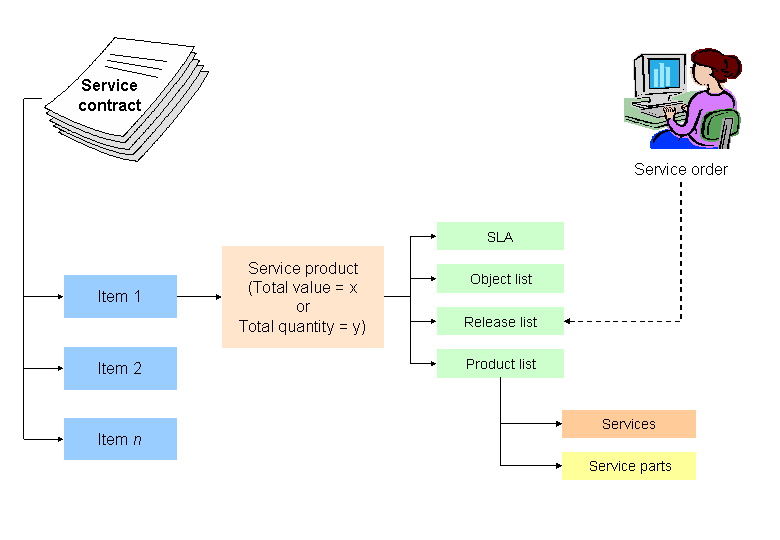
Services and service parts are entered in the product list belonging to the contract item.
The customer can claim (release) products from the product list, if required, whereby any quantity or value can be selected. The service employee creates a service order in the system for this purpose.
The system enters the released products and their quantity or value in the release list. In this way, the service employee can use the release list to trace the quantity and the value of the products that have already been claimed.
In Customizing of the item categories, you can establish:
Whether an agreed service product may be claimed only until the total value or the target quantity has been reached
Whether the target quantity or the total value may be exceeded only the first time
Whether the target quantity or the total value may in principle be exceeded
For more information, see the Integration
section.
Structure
Service contracts (value/quantity) include:
Service quantity items based on a certain target quantity, such as the use of a hotline or a repair service no more than 10 times
Service value items based on a certain target value, for example service parts and services for a total of USD 500
Combinations of service value contracts and service quantity contracts
Integration
Customizing the Transaction Type
You must make the following settings in Customizing of the transaction types so that a service contract takes on the functions of a value/quantity contract.
Go to Customizing and choose

Customer Relationship Management

Transactions
Basic Settings
Define Transaction Types
 .
.Go to the detailed view of the desired transaction type and choose
Service Contract
as theLeading Transaction Category
. This causes the fieldQuantity/Value Contract
to be displayed.Choose the value
C (= service: target value and quantity)
in the fieldQuantity/Value Contract
. In this way it is possible to enter a target value or quantity when creating a service contract (value/quantity).
In Customizing for the item categories, you can set whether or not the target quantity or value may be exceeded.
Make these settings in Customizing for
Customer Relationship Management
under Transactions
Basic Settings
Define Item Categories
.Choose the required item category. Ensure that the item object type
CRM Service Contract Item
is assigned to the item category.Go to the step
Assignment of Business Transaction Categories
and chooseSales
.Go to the step
Customizing Item
and choose a completion rule in the set typeContract Data
in theCompletion
field.
Example
A software firm has tailored a service package especially for its customers who have just introduced the software. This package includes a check shortly before the go-live date, three telephone consultations and a system check.
The firm offers the package as a service contract and sells it by request to the customer together with the software. If the customer enters into such a contract and claims a telephone consultation from the contract, the service employee then creates a service process with reference to the contract.
The system enters in the release list the service process and the service product telephone consultation
as well as the quantity 1, which has been claimed, and reduces the remaining number of consultations to 2. This process is repeated until all the consultations have been "used up".