 Service Plan in Service Contract
You can functionally enhance a service contract by adding a service plan. To do so, you enter one or more service plan items at item level in the service contract.
A service plan created in this way differs from an independent service plan in that data can be entered for business partners and billing, and this type of service plan has a time limit, since it ends when the service contract runs out.

Integration
At the item level, you process service plan data
as service data instead of service agreements.
Prerequisites
To enable processing of planned dates and service plan data, such as interval values, assign item category SPLA (Service Plan Item)
to the item. This item category must be assigned to the item object type Service Plan Item CRM (BUS2000148)
in Customizing.
Features
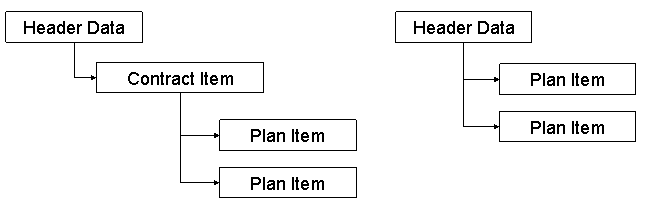
The service plan appears in the service contract at item level as a separate item category. According to the way your service contract is set up, you can create service plan items as subitems for a service contract item, or you can add service plan items directly to the service contract header without the contract item in between.
 Note
Note
If you want to create a service contract item with service plan items under it, you can use the product proposal in the service contract item. This way, you can automate creation of the service plan items. For more information, see Product Proposal.