 Revenue Recognition for Service Contracts with SAP ERP Integration
In many companies, it is necessary to perform period-based results analysis for revenues. This means that revenue must be recognized in the posting period in which the service was rendered, rather than in the posting period in which the billing document was created. You can use the revenue recognition function to fulfill this requirement by separating revenue recognition from the billing process.
The automatic transfer of data from business transactions in SAP CRM Service into an SAP ERP internal order makes it possible for you to use results analysis in SAP ERP.
 Caution
Revenue recognition in SAP CRM is applied to service contracts in SAP CRM and technically has nothing to do with revenue recognition in the SAP ERP component Sales and Distribution
(SD). Results analysis is technically used in SAP ERP component Product Cost Controlling
(CO-PC).
Revenue recognition controls how much revenue is to be reported in which posting period.
Revenue recognition allows you to recognize revenue in SAP ERP Financial Accounting, independent (timewise) of billing documents (which are normally posted to revenue accounts).
Revenue can be recognized on a periodic basis or on the basis of individual events:
Standard revenue recognition means that billing documents are posted directly to a revenue account. No results analysis takes place.
Time-based revenue recognition (periodic) means that the revenue of a contract is distributed and posted evenly over the entire contract term.
Service-based revenue recognition (value contracts/quantity contracts with a target quantity) means that the revenue is recognized based on an event. Events are releases that are reflected as a service order or service confirmations.
Revenue account determination of billing stays the same in all cases. It makes no difference whether the billing takes place in SAP CRM or SAP ERP (SD). In each case, the billed revenue is recognized at the time of billing. In the case of standard revenue recognition, the billed revenue is the same as the recognized revenue. In the case of time-based revenue recognition and service-based revenue recognition, the following applies: During the period, the recognized revenue is preliminarily the same as the billed revenue. The results analysis then carries out adjustment postings as part of period-end closing. These ensure that the final recognized revenue of the period corresponds to the revenue that is calculated according to the respective method. This means that:
When the billed revenue of the period exceeds the calculated revenue, a deferred revenue, with the amount of the revenue surplus, is formed. The recognized revenue is then the billed revenue minus the deferred revenue.
 Example
Billing posts:
Customer
toSales Revenue
(account 800100): 300 USDThe results analysis calculates, according to the selected method, a revenue of 100 USD.
In the period-end closing, the following is posted:
Deferred Revenue
(account 99056) toInventory Change Unbilled Revenue
(account 891010): 200 USD.End of the example.If the billed revenue is smaller than the calculated revenue, then an unbilled revenue, with the amount of the difference, is formed. The recognized revenue is the billed revenue plus the unbilled revenue.
ExampleBilling posts:
Customer
toSales Revenue
(account 800100): 100 USDThe results analysis calculates, according to the selected method, a revenue of 300 USD.
In the period-end closing, the following is posted:
Unbilled Revenue
(or:Products in Process
) (account 791000) toInventory Change Deferred Revenue
(account 891000): 200 USD.End of the example.
The data is in CO internal orders that are created in SAP ERP for service contract items from SAP CRM. The results analysis calculates the amounts. The actual postings are generated by the order settlement, based on custom posting rules for the results analysis. At period-end closing, results analysis and order settlement must therefore be executed consecutively.
Integration
Revenue recognition involves various components:
SAP CRM for creating the service contract, service order, and service confirmation
SAP ERP Financial Accounting (FI) for posting to general ledger accounts
The following figure shows the data flow between both systems:

Features
Service-Based Revenue Recognition (Value Contract)
The following values are determined in SAP CRM, and transferred to SAP ERP:
Target value from the service contract items
Contract start date and contract end date
Released values from the service orders or service confirmations
The following calculations are made in SAP ERP:
Results analysis amount per posting period in percent (degree of revenue recognition) = Release value per posting period / target value x 100
Recognized revenue per period = Results analysis amount per posting period in percent x Planned revenue
The planned revenue is equal to the target value.
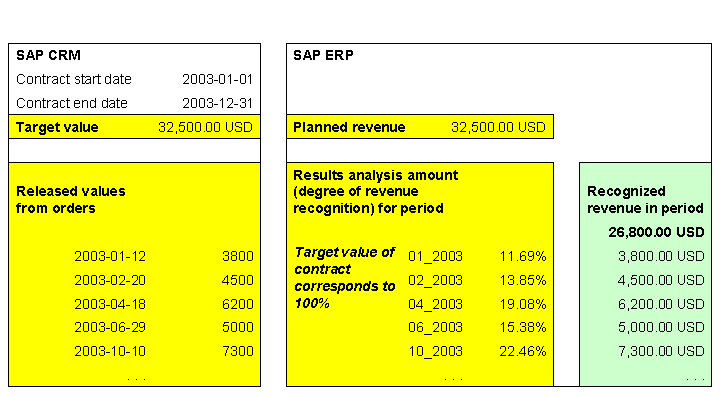
With quarterly billing, 8,125.00 USD is billed in the 1st, 4th, 7th, and 10th periods. The following amounts are calculated and posted:
Posting Date |
|||||||
|---|---|---|---|---|---|---|---|
Account |
Account Number |
2003–01–31 |
2003–02–28 |
2003–03–31 |
2003–04–30 |
2003–05–31 |
2003–06–30 |
Sales revenue (billed) |
800100 |
8125 |
8125 |
||||
Deferred revenue |
99056 |
4325 |
-4325 |
0 |
0 |
0 |
0 |
Inventory change unbilled revenue |
891010 |
4325 |
-4325 |
0 |
0 |
0 |
0 |
Unbilled revenue |
791000 |
0 |
175 |
6200 |
-3125 |
7300 |
0 |
Inventory change deferred revenue |
891000 |
0 |
175 |
6200 |
-3125 |
7300 |
0 |
Calculated revenue |
3800 |
4500 |
6200 |
5000 |
7300 |
||
Revenue surplus |
4325 |
0 |
0 |
0 |
0 |
0 |
|
Unbilled revenue |
0 |
175 |
6375 |
3250 |
10550 |
10550 |
|
Recognized revenue |
3800 |
8125 |
8125 |
16250 |
16250 |
16250 |
|
Posting Date |
||||||||
|---|---|---|---|---|---|---|---|---|
Account |
Account Number |
2003–07–31 |
2003–08–31 |
2003–09–30 |
2003–10–31 |
2003–11–30 |
2003–12–31 |
Total |
Sales revenue (billed) |
800100 |
8125 |
8125 |
32500 |
||||
Deferred revenue |
99056 |
0 |
0 |
0 |
5700 |
0 |
-5700 |
0 |
Inventory change unbilled revenue |
891010 |
0 |
0 |
0 |
5700 |
0 |
-5700 |
0 |
Unbilled revenue |
791000 |
-8125 |
0 |
0 |
-2425 |
0 |
0 |
0 |
Inventory change deferred revenue |
891000 |
-8125 |
0 |
0 |
-2425 |
0 |
0 |
0 |
Calculated revenue |
5700 |
5700 |
||||||
Revenue surplus |
0 |
0 |
0 |
5700 |
5700 |
0 |
26800 |
|
Unbilled revenue |
2425 |
2425 |
2425 |
0 |
0 |
0 |
||
Recognized revenue |
24375 |
24375 |
24375 |
26800 |
26800 |
32500 |
32500 |
|
Time-Based Revenue Recognition
The following values are determined in SAP CRM, and transferred to SAP ERP:
Contract start date and contract end date
Sum of billing request items
The following calculations are made in SAP ERP:
Results analysis amount per posting period in percent (degree of revenue recognition) = 100 / Number of posting periods
Recognized revenue per period = Results analysis amount per posting period in percent x Planned revenue
The planned revenue is equal to the sum of the billing request items.
The first period, in which the contract starts, is weighted with the number of calendar days from the contract start date until the end of the period, divided by the total number of calendar days in this period.
The last period, in which the contract ends, is weighted with the number of calendar days from the start of the period until the contract end date, divided by the total number of calendar days in this period.
All full periods between these are equally weighted with 1.
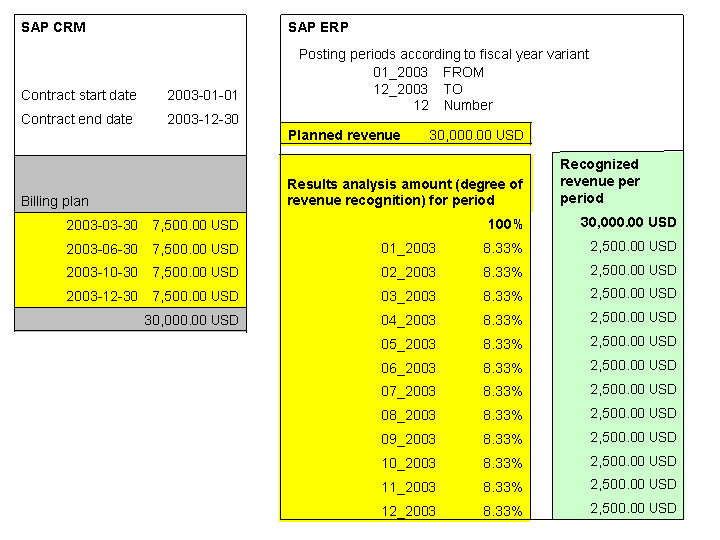
The following amounts are calculated and posted:
Posting Date |
|||||||
|---|---|---|---|---|---|---|---|
Account |
Account Number |
2003–01–31 |
2003–02–28 |
2003–03–31 |
2003–04–30 |
2003–05–31 |
2003–06–30 |
Sales revenue (billed) |
800100 |
7500 |
7500 |
||||
Unbilled revenue |
791000 |
2500 |
2500 |
-5000 |
2500 |
2500 |
-5000 |
Inventory change deferred revenue |
891000 |
2500 |
2500 |
-5000 |
2500 |
2500 |
-5000 |
Calculated revenue |
2500 |
5000 |
7500 |
10000 |
12500 |
15000 |
|
Unbilled revenue |
2500 |
5000 |
0 |
2500 |
5000 |
0 |
|
Recognized revenue |
2500 |
5000 |
7500 |
10000 |
12500 |
15000 |
|
Posting Date |
||||||||
|---|---|---|---|---|---|---|---|---|
Account |
Account Number |
2003–07–31 |
2003–08–31 |
2003–09–30 |
2003–10–31 |
2003–11–30 |
2003–12–31 |
Total |
Sales revenue (billed) |
800100 |
7500 |
7500 |
30000 |
||||
Unbilled revenue |
791000 |
2500 |
2500 |
-5000 |
2500 |
2500 |
-5000 |
0 |
Inventory change deferred revenue |
891000 |
2500 |
2500 |
-5000 |
2500 |
2500 |
-5000 |
0 |
Calculated revenue |
17500 |
20000 |
22500 |
25000 |
27500 |
30000 |
30000 |
|
Unbilled revenue |
2500 |
5000 |
0 |
2500 |
5000 |
0 |
0 |
|
Recognized revenue |
17500 |
20000 |
22500 |
25000 |
27500 |
30000 |
30000 |
|
More Information
Customizing for Revenue Recognition with SAP ERP Integration