
 Running the UWL in the Consumer
Portal
Running the UWL in the Consumer
Portal

Use
To use the Universal Worklist (UWL) in a federated portal network landscape we highly recommend running the UWL directly in the consumer portal. In this case you have fewer maintenance tasks.
The following figure shows the connections between the consumer portal and the producer portal and also the back-end systems, for example Customer Relationship Management (CRM) if the UWL runs in the consumer portal:
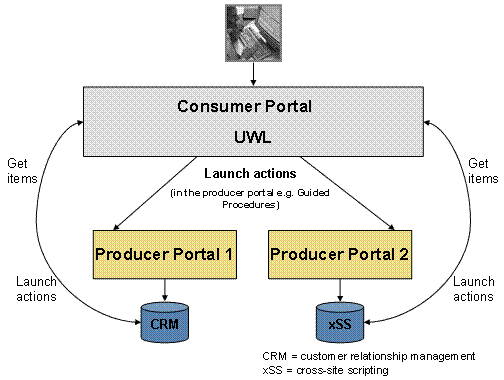

The Guided Procedures connector offers a federated connector. A federated connector is a UWL connector that connects to remote producers.
Procedure
You have to configure the UWL to do the following:
● Connect directly to the Business Workflow and alert systems to get work items and alerts
● Launch applications in corresponding producers and back-end systems.
1. Transport XML configurations
Transport the XML configurations manually from all producers to the consumer.
More information: UWL Content Configuration
Clear the cache after the XML configuration upload.
If producers run different versions of the same application, merging XML configurations from different versions can cause item type and view name conflicts.
2. Copy iViews and Portal Pages as Remote Delta Links
Copy all iViews and portal pages that have to be launched as a remote delta link from all producers to the consumer.
If producers run different versions of the same application, the iViews or portal pages to be launched can have the same IDs in several producers. In this case, the remote delta link of the conflicting iViews and portal pages has to be resolved manually. The remote delta link to the consumer can only copy one of the source objects in the producer into the same location and ID of the source object in the producer. All other objects must be copied as remote delta links to a different location in the consumer, which causes a change in their original ID.
More information: Copying Remote Content to Your Consumer
Since item types are configured to launch iViews or portal pages, the iViews and portal pages are configured against an iView ID or a portal page ID. This requires a manual change in the configuration XML file. This also implies that if an item type is configured in the back end its configuration has to be overwritten by a configuration XML file.
Example:
Producer 1 has an item type configured to launch an iView ID1:
<Action
name="launchIView" handler="IViewLauncher">
<Properties>
<Property name="iview"
value="ROLES://portal_content/com.sap.pct/every_user/general/iViews/myDemoIView"/>
</Properties>
</Action>
Producer 2 has an item type configured to launch the same iView ID1:
<Action
name="launchIView" handler="IViewLauncher">
<Properties>
<Property name="iview"
value="ROLES://portal_content/com.sap.pct/every_user/general/iViews/myDemoIView"/>
</Properties>
</Action>
The iView ID from producer 1 is linked by a remote delta link to iView ID1 at the consumer. iView ID1 from producer 2 is linked by a remote delta link to iView ID2 at the consumer. You have to change the configuration XML file from producer 2 before you upload it in the consumer portal:
<Action
name="launchIView" handler="IViewLauncher">
<Properties>
<Property name="iview"
value="ROLES://portal_content/com.sap.pct/every_user/general/iViews/myDemoIView1"/>
</Properties>
</Action>
3. Transport System Definitions and Their Aliases
Transport the system definitions and their aliases manually from the producers to the consumer.
If producers run different versions of the same application, the same system alias name can point to different back-end systems. The system alias names in the consumer portal are allowed to be defined differently. This implies that the XML configurations from producers do not have to contain any references to system aliases defined in producer portals.