Delivering Several Items With One Delivery
Use
Particular items in a sales order may logically belong together and should therefore be delivered with a single delivery.
You can ensure that these items are delivered with one delivery by assigning each relevant item to the same delivery group.
 Example
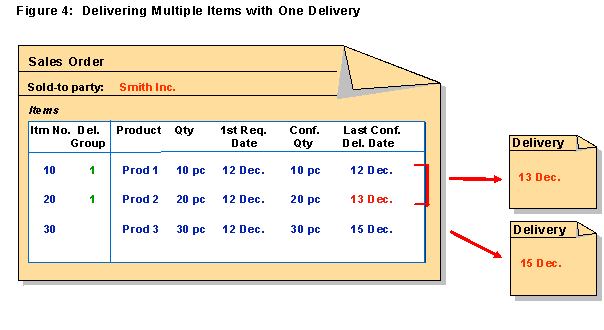
In the following example, all items are relevant for the availability check.
The first two items are assigned to delivery group 1 and will therefore be delivered together on the last confirmed delivery date of item 20 (December 13). Item 30 is not assigned to the delivery group and will be delivered at the later confirmed date of December 15.
Features
When you assign an item to a delivery group, a delivery group schedule line will be generated for this item. The date for the delivery group schedule line will be taken from the confirmation schedule line with the latest confirmation date.
The delivery group schedule line, and not the confirmation schedule lines, will be used as a basis for delivery.
Activities
To assign several items to a delivery group, enter the same number in the
Delivery Group
column for each relevant item.
To group items for several deliveries, enter different delivery group numbers for the relevant items.
Example
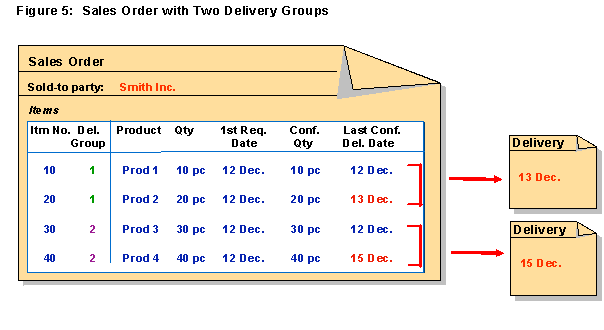
In the following example, all items are relevant for the availability check.
Items 10 and 20 are assigned to delivery group 1 , items 30 and 40 are assigned to delivery group 2 .