
 Composite Roles, Single Roles and Workplace
Scenarios
Composite Roles, Single Roles and Workplace
Scenarios

Composite and Single Roles
You should take the following into consideration when you upload (single and composite) roles from an ABAP-based system to the SAP NetWeaver Portal:
● If a target system is entered in a single role, this means that the role contains transactions and other objects that do not run in the system in which you are currently working. Single roles may only contain objects from a single target system. If no target system is entered in a single role, it exists locally in the system in which you are currently working.
● When you create composite roles, the single roles are read in the menu of the composite roles. Composite roles may contain single roles whose contents run in different systems.
Note the following issues when uploading roles:
● You always load single and composite roles from the system containing the menu information for these objects. This can be the system in which they were defined or another system to which they were transported.
● If a target system that differs from the local system (= the system you are logged onto) is entered for a single role, note that you may not upload this role from the local system. In this case the role contains menu entries that run in another system and the upload from the local system will not work correctly. Instead, the role must be uploaded from the target system.
● If no target system is entered in a single role, you can assume that it exists locally and does not get its contents from another system. In this case you can upload the role from the local system.
● You can upload single roles as worksets (and not as roles). You can then regroup and restructure the single roles in the portal by assigning them to a portal role and redefining the navigation structure within this role.
● If you upload composite roles, you should consider whether or not the single roles they contain should be stored in the portal as separate objects. If you want the single roles to be separate objects, proceed as follows:
...
a. Upload the single roles with the services they contain.
b. Upload the composite roles without the services they contain.
● If you do not want the single roles included in the composite roles to be separate objects in the portal, you should define that you want to upload the single roles with the included services when you upload the composite roles. For more information, see the Workplace scenarios below.
Workplace Scenarios
Composite roles are created, maintained, and changed on the Workplace Server. The Workplace Server is a special ABAP-based SAP system that is linked with other back-end systems via RFC definitions. On the Workplace Server, single roles are grouped together as a composite role and arranged so that they represent the LaunchPad (the user’s menu structure).
Single roles exist on both the Workplace Server and the backend systems. The contents of a single role only run in the backend system unless they were also created locally on the Workplace Server.
This results in the following system landscape:
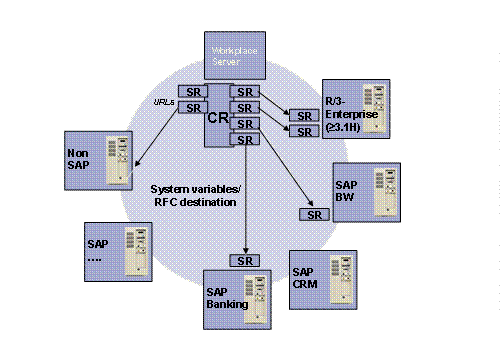
When you upload roles from Workplace systems, you have the following scenarios:
● You upload the single roles with the services they include.
You can upload the single roles from a Workplace system landscape and dispense with the composite roles. The single roles are in the component systems. In some cases there may be local single roles on the Workplace Server.

Always upload single roles from the component systems or from the systems containing the role contents locally. For example, if you upload a single role from the Workplace Server and the Workplace Server is not defined as its target system, the upload does not work correctly.
You can also upload single roles as worksets (and not as roles). You can then regroup and restructure the single roles in the portal by assigning them to a portal role and redefining the navigation structure within this role.
● You upload the single roles and then the corresponding composite roles.
Single roles are created in the portal as separate objects. You want the menu structure of composite roles in the portal.
Do the following:
...
a. Upload the single roles from the Workplace component systems with the services they include, as described above.
b. Upload the composite roles without the services they contain.
If you do not want to create the single roles as separate objects, proceed as described below.
● You upload composite roles with all the services they include.
When you upload composite roles with all included services from the Workplace Server, the corresponding single roles are also uploaded to the portal with all the included services. This means that both the menu structure and the included services are uploaded to the portal and stored in the PCD.
A target system must be entered in each single role on the Workplace Server. The target systems are the component systems containing the contents of the roles. For each target system, a system with a connection to this target system must be set up in the portal. For more information, see Requirements.
When you upload composite roles with included services, the contained single roles are not created as separate objects (roles or worksets) in the portal. The composite role is only converted to a single portal object: either one portal role or one workset.
If you want your single roles to be separate objects in the portal, you must upload them separately as described above.