 Supported Elements of the Adobe Library
Special Adobe UI elements are available in the Adobe LifeCycle Designer for form development in a Web Dynpro ABAP application. Go to the Layout tab page in the form builder.
On the Properties tab of the Form Builder, choose the entry ZCI Layout as the Layout Type, and use the Web Dynpro Native library in Adobe LiveCycle Designer.
The following elements are currently supported by the Web Dynpro ABAP environment:
Send
With the Web Dynpro form UI element Send, the input data of a PDF form is sent to an SAP backend system. The Web Dynpro context bound to the InteractiveForm(property dataSource in the view designer) is updated with the input data. As long as the event onSubmit of the Web Dynpro UI element InteractiveForm is set, it is triggered.
EnumeratedDropDownList and EnumeratedDropDownListNoSelect
Both value helps can be retrieved from the Web Dynpro Native library in the Adobe LifeCycle Designer using drag and drop on the form. The difference between the two values is that EnumeratedDropDownListNoSelect does not automatically select a value if either no entry at all is found in the data part or no entry is found that is relevant to the current selection list. Whilst EnumeratedDropDownList would automatically retrieve the first entry from the selection list.
Procedure
Place the Adobe UI element as usual on the template and bind it to the context in the data view.
Change the element value binding.
Choose Element Values.
On the following popup the following entry for Objects appears below the group title Binding:
 Syntax
$record.sap-vhlist.REPLACE_THIS.item[*]
End of the source code.Replace REPLACE_THIS with the SOM expression of the data binding.
You can get this value from the Object menu. This is the value that appears after $record in the standard binding.
 Example
Node.DVH3.
End of the example. Note
NoteNote that you escape each point of the SOM expression with \.
End of the note. ExampleExample of a correct value:
$record.sap-vhlist.Node\.DVH3.item[*]
End of the example.
Note
The values of the EnumeratedDropDownList are taken from the value set (VALUE_SET) of the bound Web Dynpro attribute. If the type of the attribute is DDIC (ABAP Dictionary) and domain fixed values are defined, these are shown. You can also program the value set to fill with values at runtime.
Input Help
The Adobe UI element input help makes it possible to call an input help from the form.
Example
 (Example of input help in an input field)
Note that the piece of code(xfo) behind the input help control must be slightly adjusted. Enter the name of the bound attribute as field name. In the present example this is CARRID.
Before:
 (var fieldName)
After:
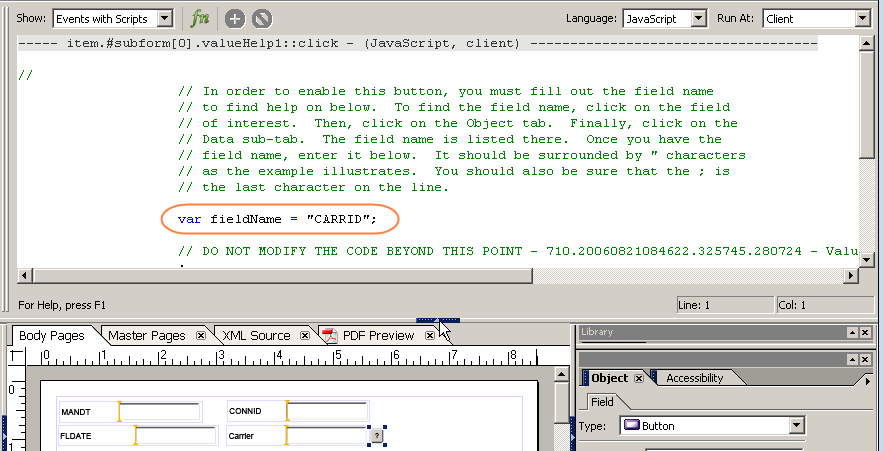 (Adjusting the input help; you may have to move the triangle symbol to make the coding visible and to execute the changes.)
So the Adobe UI element input help is the connection to the Web Dynpro ABAP input help.